You've got budget for a backlink. Should you order a guest post, or a link insertion? Most guides say "it depends" and stop there. This one gives you a straight answer, the reasons behind it, and real prices from the 650,000+ listings in the seotools.pro link building catalog.
Here's the short version. A link insertion usually starts working sooner, because it goes on a page Google already knows and trusts. A guest post gives you more control, but it starts from zero. And on busy sites, site owners know the difference: they charge more for the insertion.
A link insertion usually ranks faster. Your link lands on a page that's already indexed, already trusted and often already getting visits. A guest post is slower to start, but you control the article, the topic and where your link sits.
- A link insertion usually starts working sooner: the page is already found, indexed and trusted.
- A guest post starts from zero, but you control the article, the topic and the link spot.
- On the same site, the insertion costs more 54% of the time, and up to 60% more on busy sites.
- Google counts links continuously, so the page your link sits on matters more than the wait.
- The best plans use both: insertions on pages that already rank, guest posts where no page fits.
Guest post vs link insertion at a glance
| Guest post | Link insertion | |
|---|---|---|
| What it is | A new article on another site, with your link inside | Your link added to an article that's already live |
| Page age | Brand new | Months or years old |
| Already in Google? | Not yet. It has to be found and indexed | Yes |
| Traffic on day 1 | Zero | Whatever the page already gets |
| Speed to start working | Slower | Faster |
| Control | You pick the topic, the words and the link spot | You fit into someone else's article |
| Work for you | Write an article (or order one) | Just your link and anchor text |
| Median price, same sites | $108 | $127 |
| Best for | New topics, brand stories, full control | Fast results on pages that already rank |
Guest Post vs Link Insertion: The Difference
Both get you a backlink, which is a link from another website to yours. Google treats good backlinks like votes of trust. The difference is the page your link lives on.
Both are popular. A uSERP survey of link builders, cited by BuzzStream, found guest posts make up about 13% of their link building and link insertions about 10%. Most teams use both.
What is a guest post?
A guest post is a brand-new article published on someone else's site. Your link sits inside it. You write the article, or you pay someone to write it, and the site owner publishes it.
You get to pick the topic, the angle and where the link goes. You can link with the words you want, called anchor text (the clickable words of a link). Some sites also give you an author bio.
What is a link insertion?
A link insertion (also called a niche edit) adds your link to an article that's already live. The site owner finds a sentence that fits, and either links a few words or adds a short line with your link.
You don't write anything. You send the page you want linked and your anchor text, and that's it.
Which One Ranks Faster?
A link insertion, in most cases. To see why, you need to know what Google does before a link can help you.
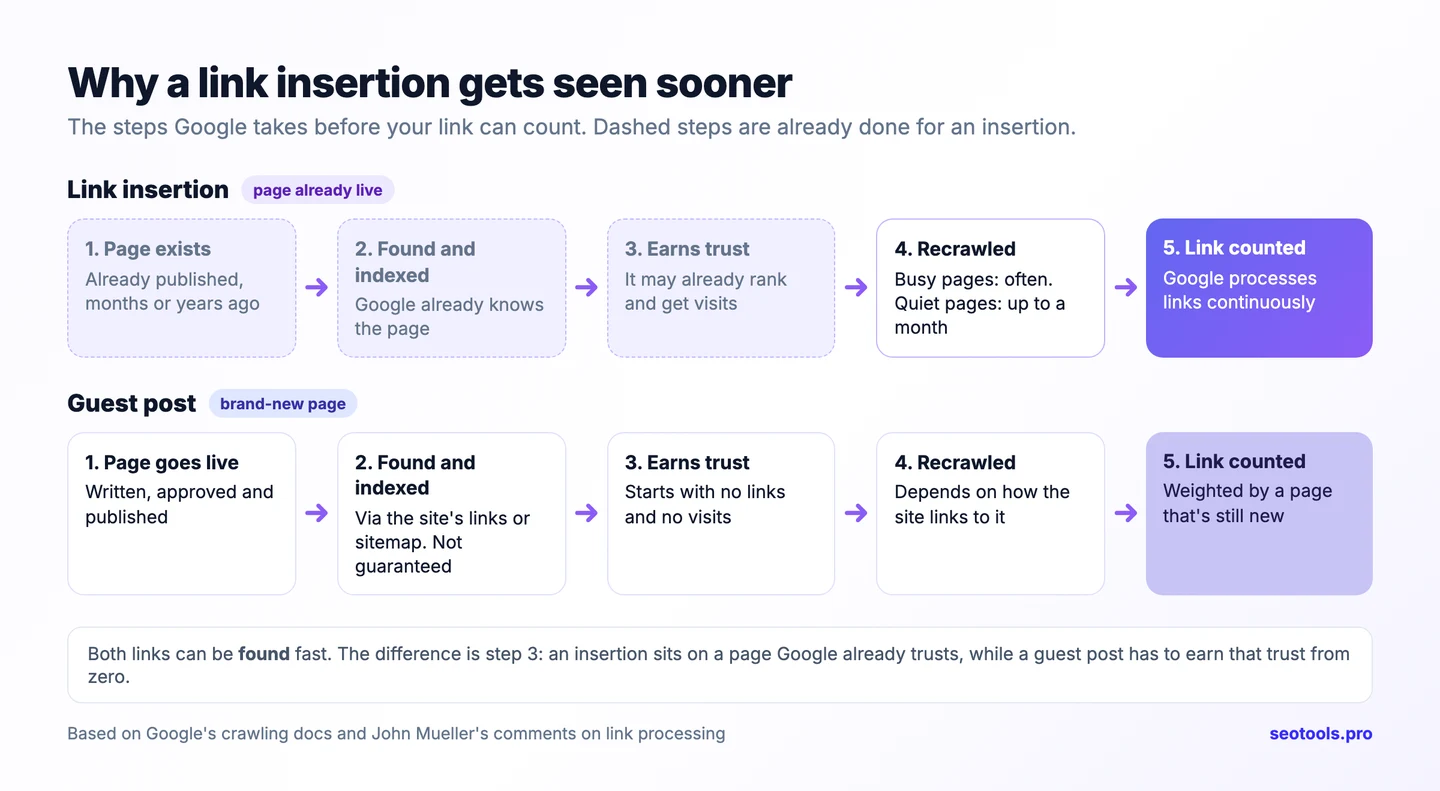
Step 1: Google has to find the link
Google finds new links by crawling, which means its bot visits pages and follows the links on them. It doesn't visit every page every day. Google's own crawling guide says it may recrawl busy news homepages every few minutes. For pages that haven't changed in years, it says "we might wait a month to recrawl".
A link insertion goes on a page Google already visits. A guest post is a new page, so Google first has to discover it, usually through the site's homepage, category pages or sitemap.
There's a shortcut. The site owner can submit the new page in Google Search Console (Google's free tool for site owners), using the URL Inspection tool. Only the owner can do it, because Google says you can't request indexing for URLs that you don't manage. So after your guest post goes live, ask the editor to submit it. Even then, Google says crawling can take "a few days to a few weeks".
Step 2: Google has to index the page
A new page isn't in Google until it's indexed (added to Google's database). That isn't guaranteed. Google skips plenty of pages it thinks aren't worth storing. An insertion skips this step, because the page is already indexed.
Step 3: the page has to carry weight
This is the big one. Google's John Mueller has said link processing doesn't wait for a set date:
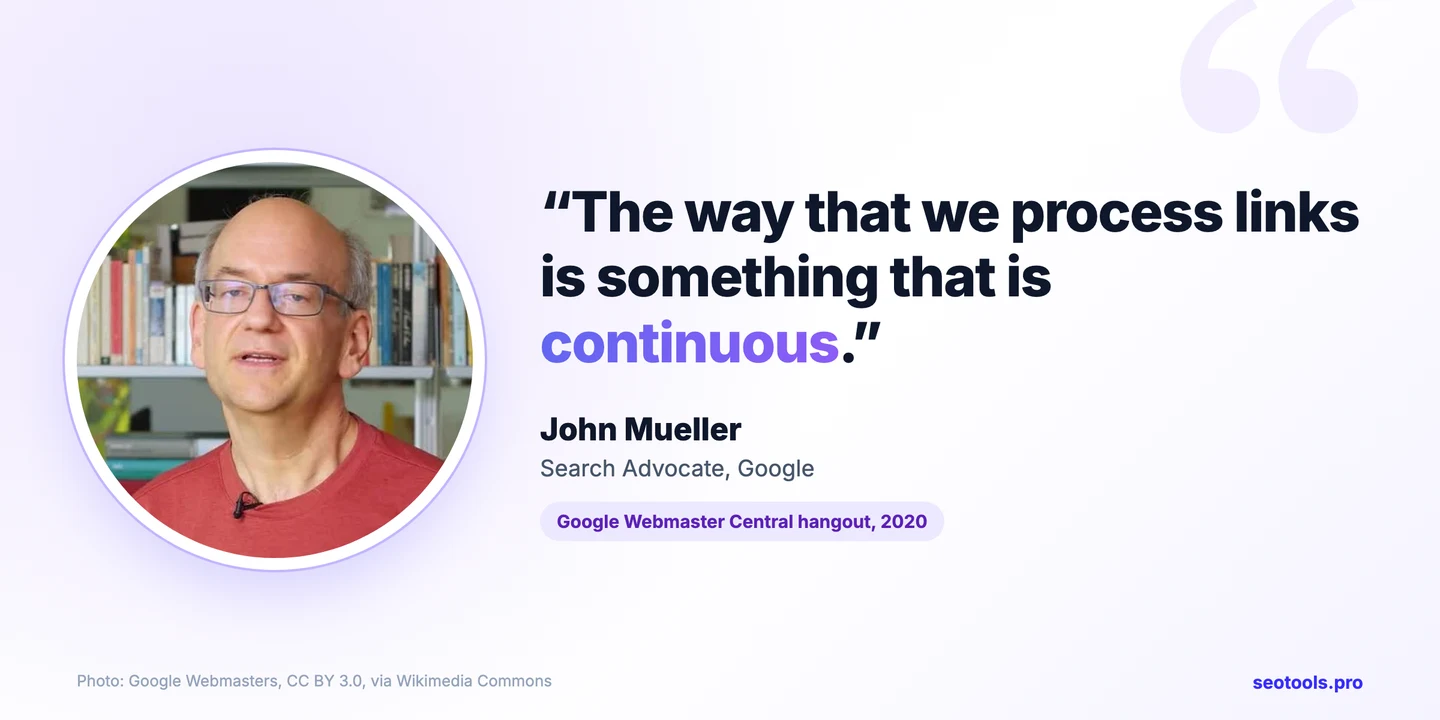
So once Google sees a link, it can count it right away. But how much it counts depends on the page it's on. A page that's old, linked to and already getting visits passes more trust than a page born yesterday.
How long does it actually take?
Nobody can promise a date, and anyone who does is guessing. Here's what the data says:
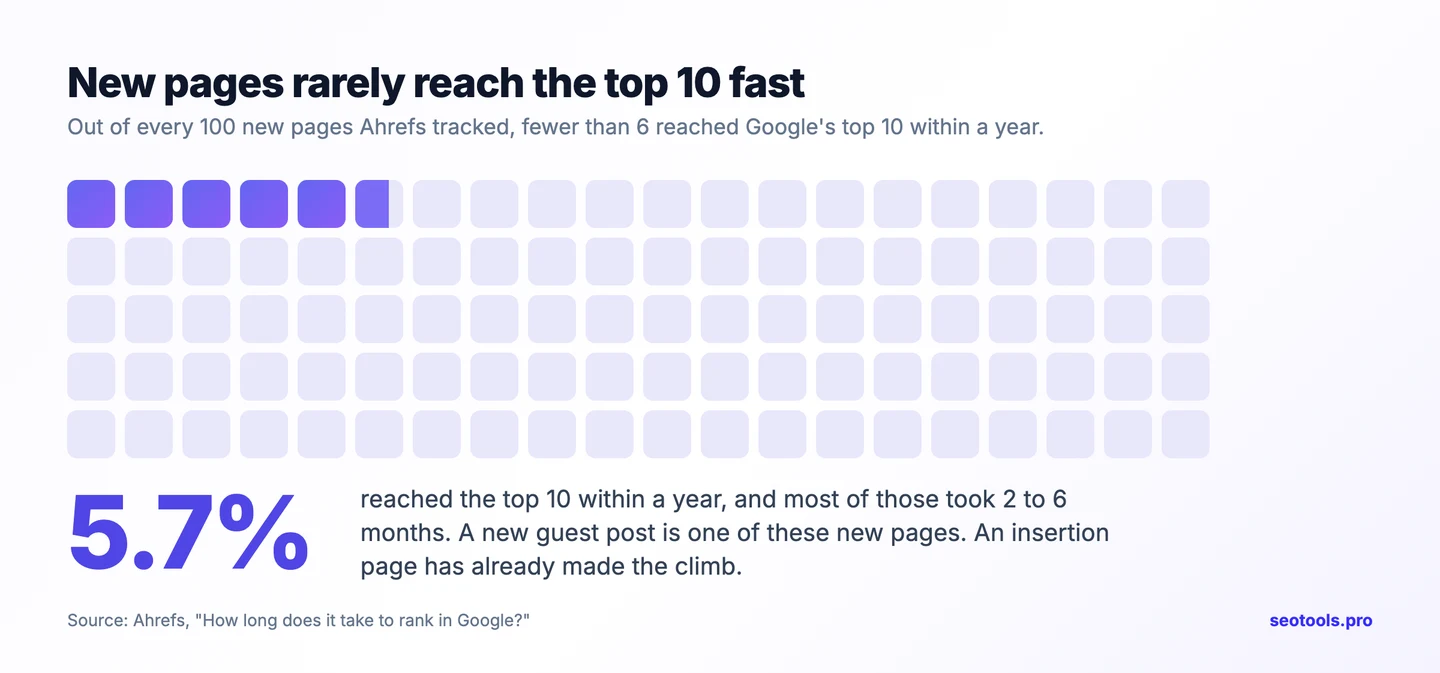
- Ranking is slow for everyone. Ahrefs tracked new pages for a year. Only 5.7% of them reached the top 10 in that time, and most of those took about 2 to 6 months.
- A new guest post is one of those new pages. It has to rank, or at least earn trust, before its link means much.
- An insertion page has already done that work. It may already rank and get visits on day 1.
So the honest answer is this: an insertion gets seen sooner and starts on a stronger page. A guest post can catch up, but only if the site promotes it and links to it.
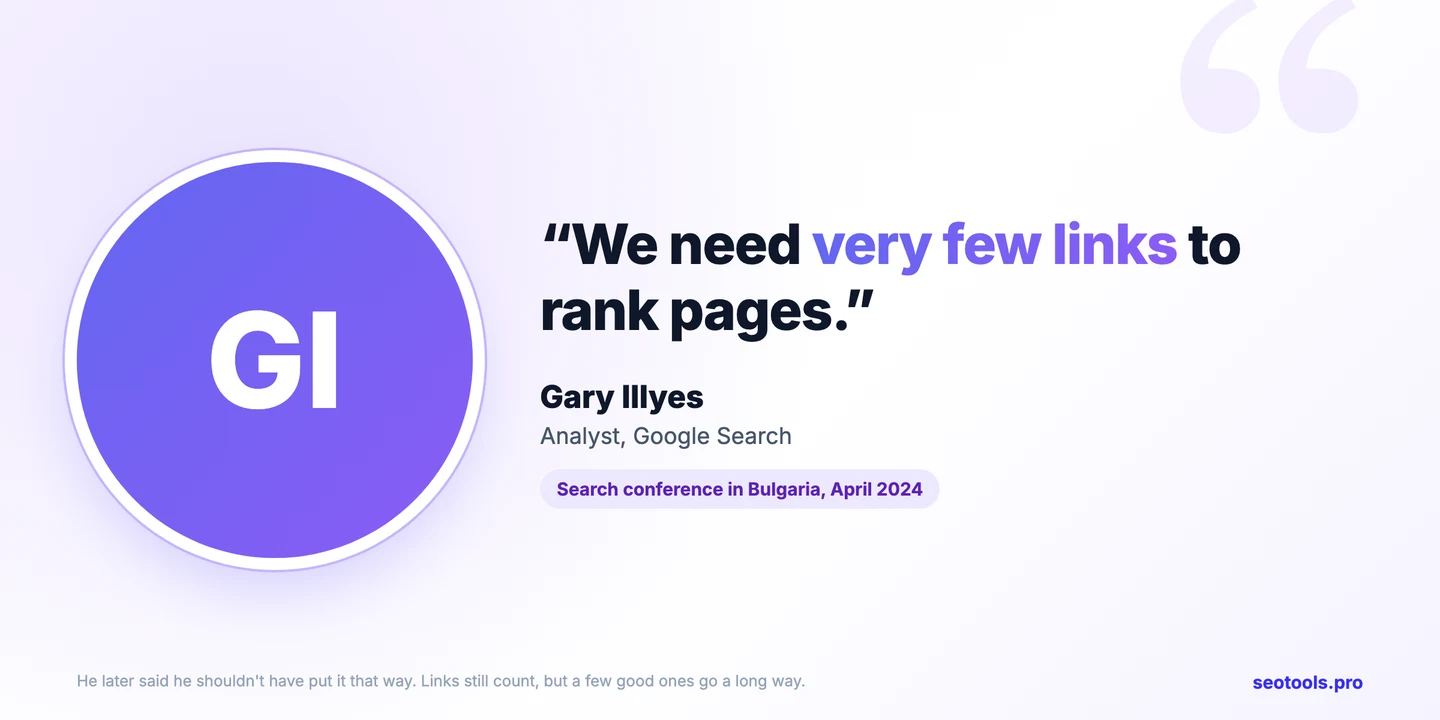
Illyes's point matters here too. If Google needs only a few good links, then 1 link on a trusted, relevant page beats 5 links on brand-new pages nobody visits.
What Each One Costs
Most guides say link insertions are the cheap option. BuzzStream, for example, put the average insertion at $179 and the average guest post at $461. But that compares different sites.
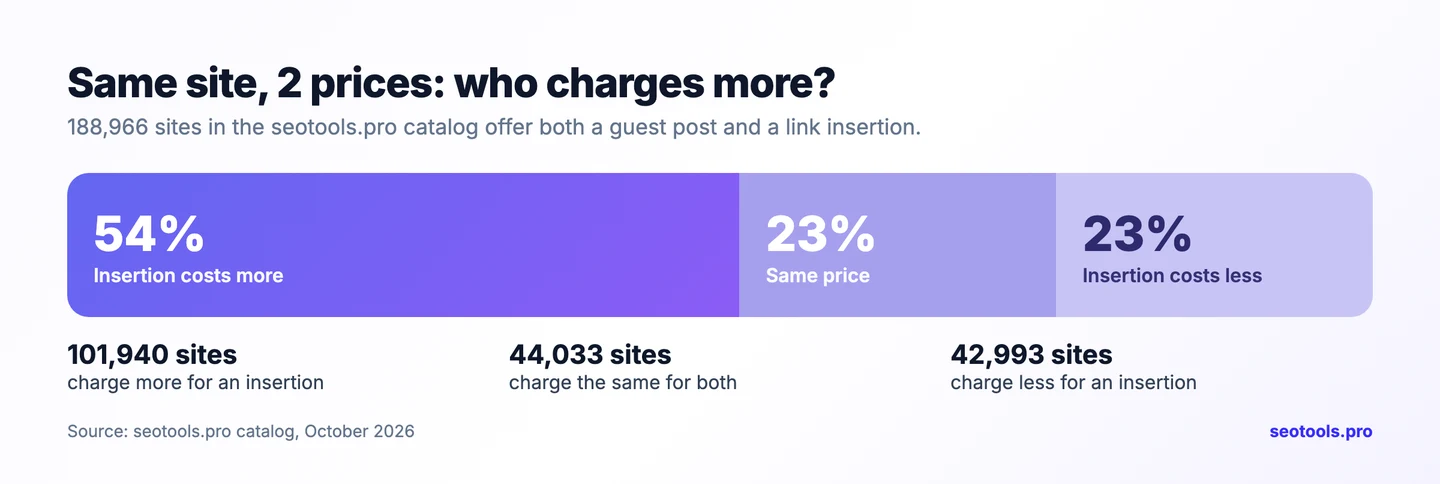
So we checked the same sites. We went through all 650,000+ listings in the seotools.pro link building catalog and found 188,966 sites that sell both a guest post and a link insertion. Then we compared the 2 prices on each site. You can open the catalog and check any of these prices yourself. Here's what owners charged in October 2026:
- On 54% of sites, the insertion costs more than the guest post.
- On 23%, they cost the same.
- On 23%, the insertion is cheaper.
- Median price: $108 for a guest post, $127 for an insertion.
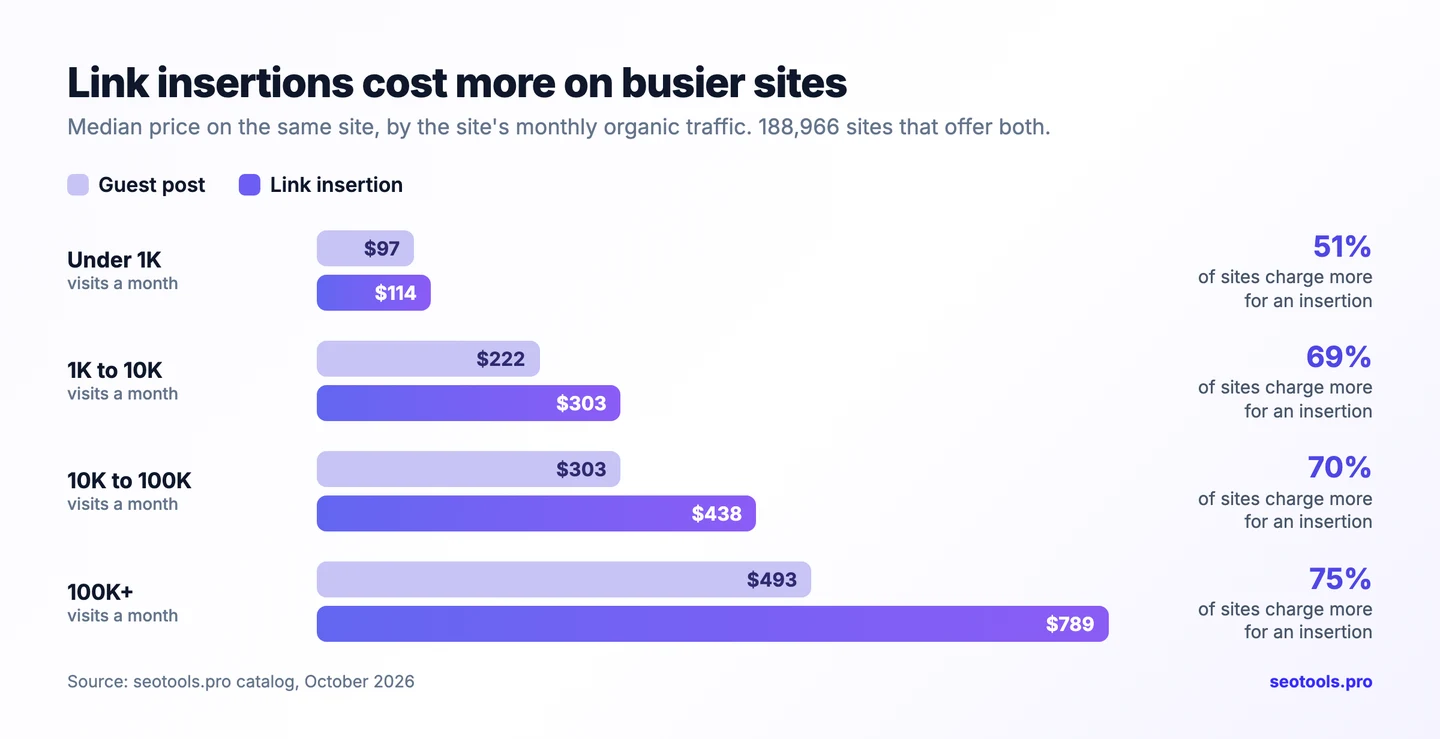
Why would an insertion cost more when it's less work? Because site owners know which link helps faster. An insertion lands on a page that already ranks and gets traffic. A guest post is a gamble on a page that doesn't exist yet. The market prices that in, and the gap grows with traffic:
| Site's monthly organic traffic | Sites | Median guest post | Median insertion | Insertion costs more |
|---|---|---|---|---|
| Under 1,000 | 159,096 | $97 | $114 | 51% |
| 1,000 to 10,000 | 17,874 | $222 | $303 | 69% |
| 10,000 to 100,000 | 9,010 | $303 | $438 | 70% |
| 100,000+ | 2,986 | $493 | $789 | 75% |
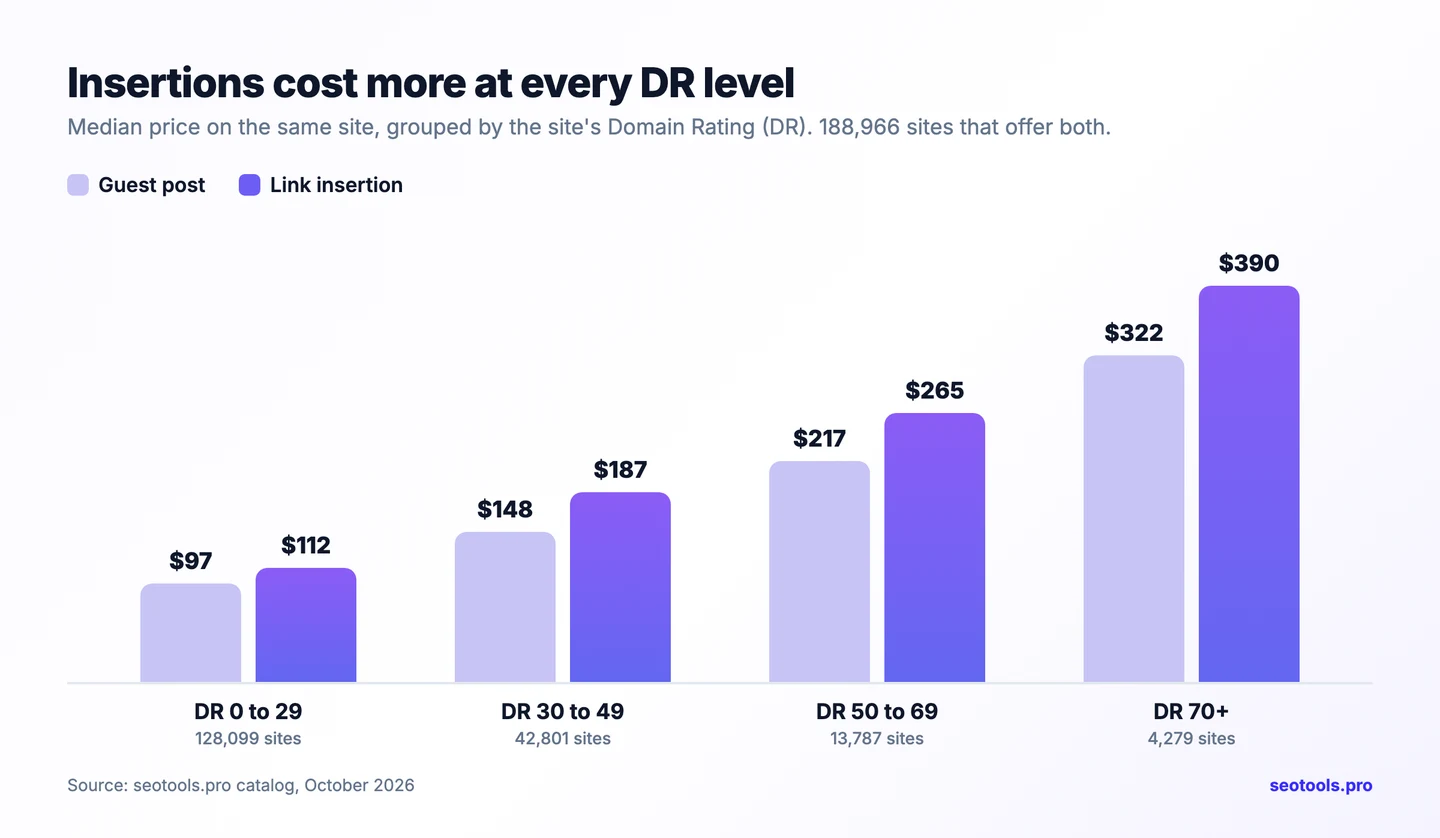
It's not just traffic. Sort the same sites by DR (Domain Rating, a 0 to 100 score for a site's links), and insertions cost more at every level:
Insertions are also the scarcer option. Far fewer sites offer them at all:
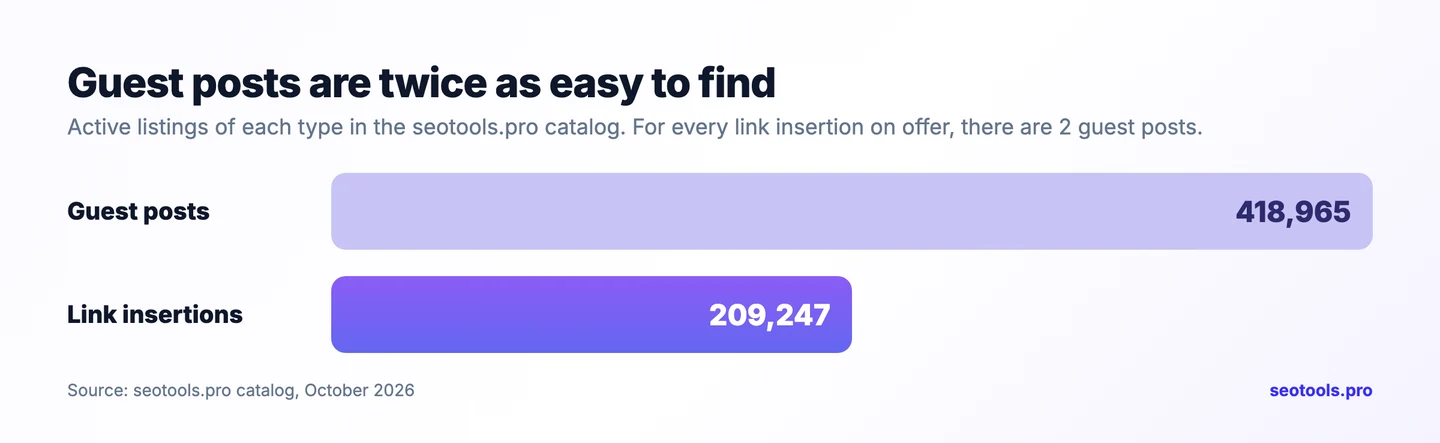
One thing to keep in mind: a guest post price usually means you send the article. If you want it written for you, add the cost of the writing. Even then, on busy sites the insertion often still costs more.
We compared the guest post price and the link insertion price on every active site in the seotools.pro catalog that offers both, synced in October 2026. Traffic is the site's monthly organic traffic from Google. Duplicates and short-term deals were left out.
When a Guest Post Is the Better Pick
A guest post is slower, but it's the right call in a few cases:
- No page on the site fits your link. If the site has never written about your topic, there's nothing to insert into. A guest post creates that page.
- You want to tell a story. A full article can explain your product, your data or your case study. An insertion is one sentence.
- You want full control. You choose the topic, the angle, the anchor text and exactly where your link sits.
- You want brand reach. A good guest post can bring readers, an author bio and a mention of your name, not just a link.
- You're on a tight budget on a busy site. On sites with 10K+ visits, the guest post is cheaper on most of them (see the table above).
To make a guest post work faster, ask the site to link to it from its homepage or a category page. Google recrawls those pages often, so your new post gets found sooner.
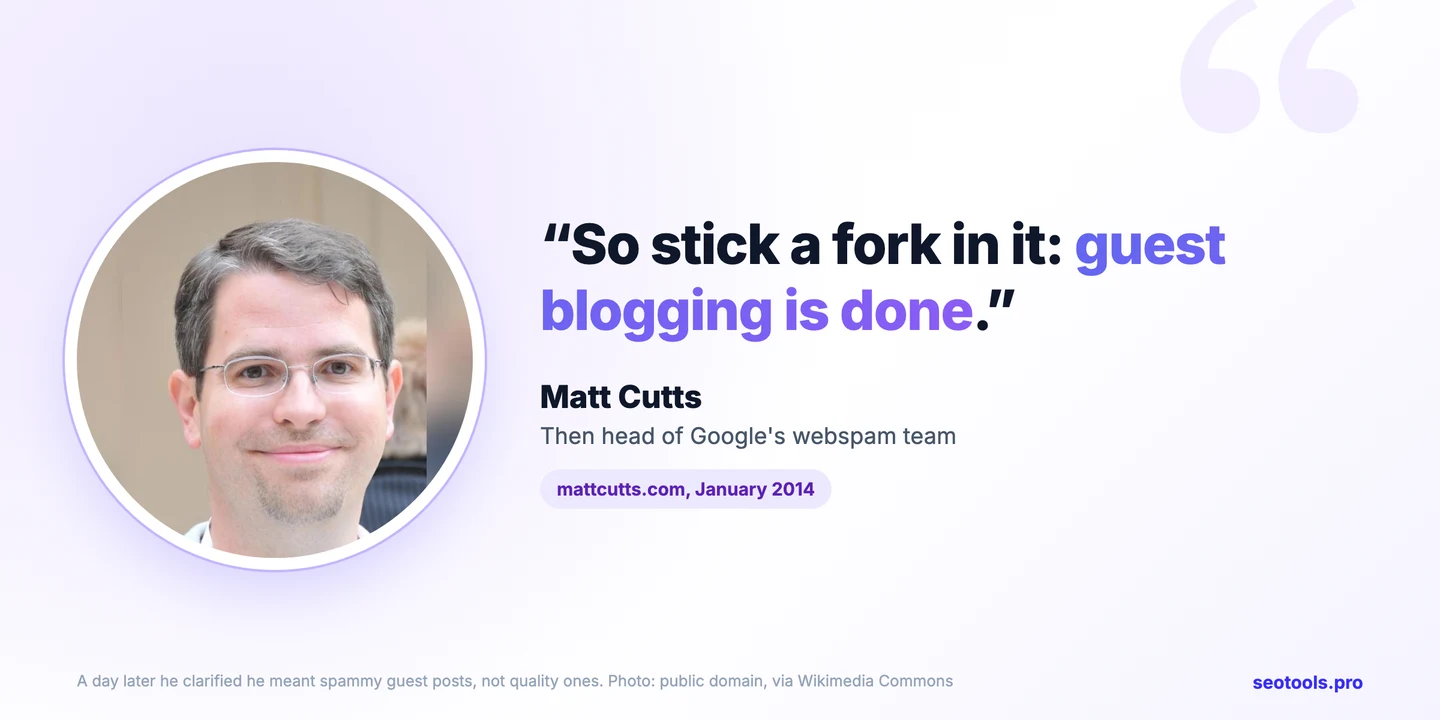
That line scared a lot of people. But a day later Cutts added that he didn't mean to throw out all guest posting, and that good posts on quality sites were fine. His target was spam: the same thin article sent to hundreds of sites just for the link. That's still the line today.
Is guest posting black hat?
It depends on why you do it. Google treats guest posts written mainly to get a link as link spam. Think of the same thin article sent to 100 sites, each with a keyword stuffed into the anchor. That's the black hat version, and it's what Cutts was warning about.
But Google's own guidance also says guest content is fine when it informs readers, teaches another site's audience something, or raises awareness of a cause or company. That's why so many white hat SEOs still write guest posts. They're after 2 things: sharing real value, and getting in front of the right readers.
Here's the simple test. Would you still write this post if the link were nofollow? If yes, you're bringing value, and Google is far more likely to give that link real weight. If the link is the only reason, skip it.
How to land guest posts without a marketplace
A marketplace is the fast way. But you can also earn guest posts by hand, and many of the best links come this way:
- Make a list of sites your buyers read. Look for blogs and publications in your niche that publish outside writers. Search Google for your topic plus words like "write for us" or "contributor".
- Read before you pitch. Learn what each site covers and what its readers care about. Editors can tell when you haven't.
- Pitch by email with 2 or 3 specific ideas. Give each idea a working title and one line on why their readers would care. Short and personal beats a long template.
- Build the connection first. Share their posts, reply to their newsletters, and help where you can. People publish writers they already know.
- Aim for recognizable publications. One post on a well-known site in your industry is worth more than 10 on blogs nobody reads. Bring original data, a case study or real experience to get in.
When a Link Insertion Is the Better Pick
A link insertion is the faster option, and it shines when:
- The site already has a page on your topic. Your link fits in naturally, next to words about the same thing.
- That page already ranks and gets visits. You get trust and maybe real clicks from day 1.
- You want results soon. No writing, no waiting for a new page to be found and indexed.
- You don't have time to write. You send a URL and anchor text, nothing else.
The catch: the page has to really be about your topic, and it has to really rank. A link on an old page that nobody reads is just old, not strong.
How to find insertion pages that already rank
This is where most marketplaces leave you guessing. They show a site's DR and a traffic number, but not whether it ranks for your topic. On seotools.pro, Topic match checks that for you. Type up to 5 keywords, open the Link insertion tab, and check 50 sites in one click.
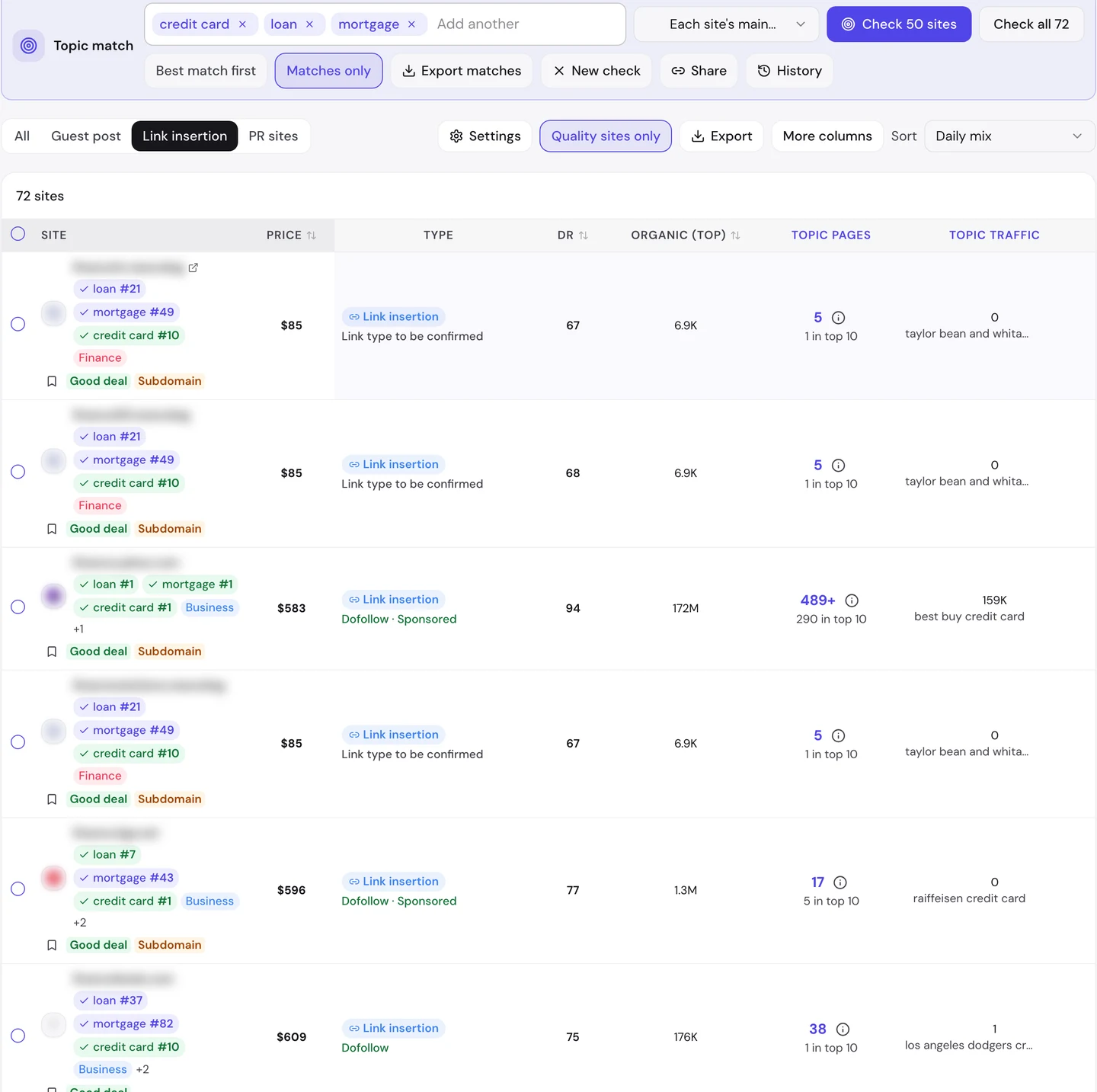
Look at the "Topic pages" column. It tells you how many pages on each site rank for your words, and how many sit in the top 10. Those are exactly the pages you want your link inserted into. The site in the third row has 290 of them in the top 10, so an insertion there lands on a page Google already sends people to.
How to earn link insertions without a marketplace
You can also get links added to existing pages by hand. These 3 methods have worked for years:
- The Skyscraper Technique. Find a popular article on your topic, make something clearly better, then email the sites that link to the old one and ask them to link to yours. Brian Dean of Backlinko made it famous, and his step-by-step guide is still the best place to start.
- Broken link building. Find a link on a relevant page that points to a dead page. Tell the site owner, and suggest your page as the fix. You're doing them a favor, so the reply rate is higher. Ahrefs has a full broken link building guide.
- "Best of" list outreach. Search for list posts in your niche, like "best email tools" or "top project management apps". If your product belongs on the list, email the author with a short reason why. List posts get updated often, so a good fit gets added.
All 3 take time, and most emails get no reply. That's the trade-off. A marketplace gets you the same kind of link in minutes, because the site owner has already said yes.
Filter 628,241 sites, switch to Link insertion, and check which ones rank on Google for your own keywords.
- Guest posts and link insertions side by side
- Topic match for up to 5 keywords
- Price, DR and traffic before you sign up
- One checkout for the whole order
How to Make Either Link Work Faster
Whichever you pick, these steps get your link seen and counted sooner.
Check 3 things, not just DR
DR tells you how strong a site's links are. It doesn't tell you if anyone reads the site, or if Google sees it as an expert on your topic. So check 3 things before any link, guest post or insertion:
- DR (authority). A 0 to 100 score for the site's own backlinks. Higher is stronger, but it's only the first filter.
- Organic traffic (real readers). How many people reach the site from Google each month. A DR 70 site with 200 visits won't help you much. Look at the traffic from the country you sell in, and make sure it's steady, not one big spike.
- Relevance (same topic). Does the site actually rank on Google for words close to your business? A site that calls itself "finance" but ranks for nothing in finance isn't a finance site.
You can check all 3 in one place. On seotools.pro, every site shows its DR and 3 kinds of traffic before you sign up. You can filter by organic traffic, traffic in the top country, and stable traffic (the site's lowest month, so spikes can't fool you). Topic match then checks relevance: it shows where each site ranks on Google for up to 5 of your keywords.
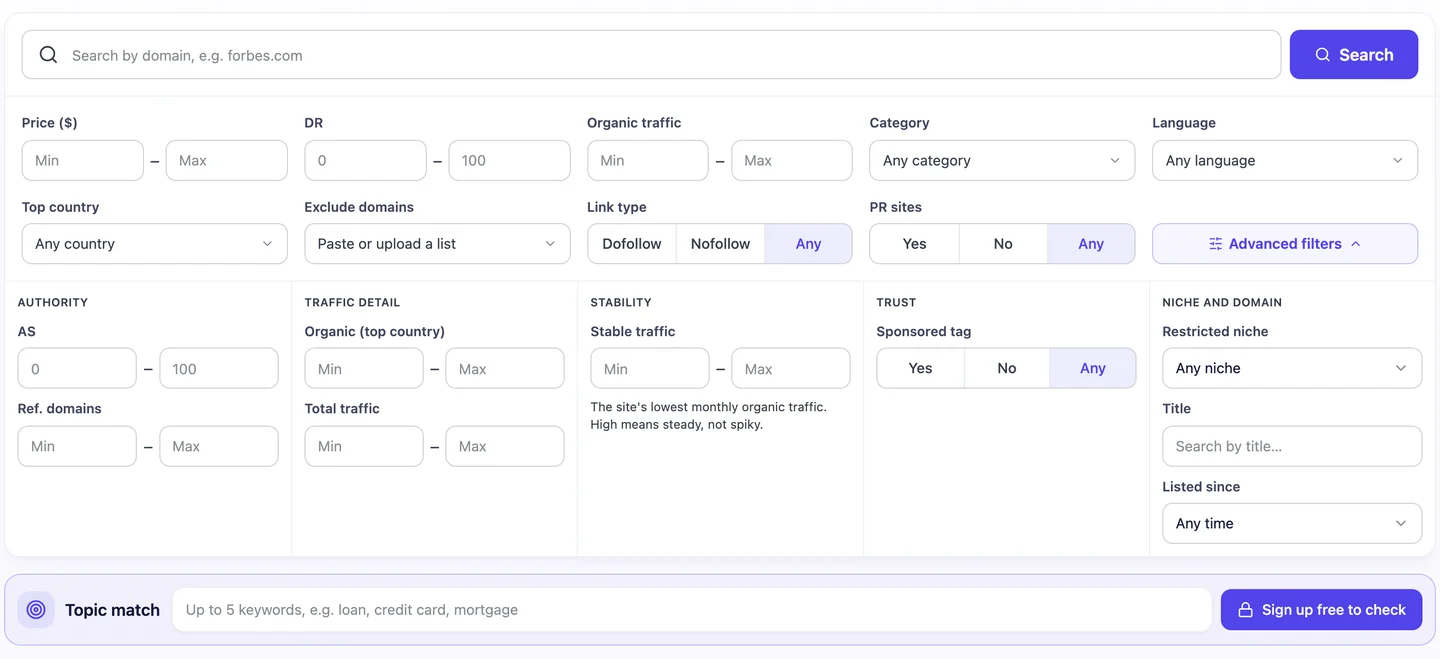
Have a site in mind from outside the catalog? Check it with the free tools: the Organic Traffic Checker for real visits, the Backlink Analyzer for its links, and Batch Analysis to compare 3 sites side by side.
For both
- Check the site's other links. If it links out to casinos, pills and loans on every page, skip it. The Backlink Analyzer shows this in a minute.
- Mix your anchor text. Use your brand name, your URL and plain words like "this guide". Don't use the same keyword every time.
- Link to a page that deserves it. Point the link at a useful page on your site, not just your homepage.
Mistakes that slow both down
- Choosing by DR alone. A high score with no traffic usually means a site built to sell links. Google trusts it less, and so should you.
- Linking from a page off your topic. A recipe page linking to a payroll app helps nobody, and Google can tell.
- Using the same exact-match anchor every time. It's the pattern Google's spam policy calls out by name.
- Never checking the link again. Pages get edited and links get removed. Check your live links every few months.
For a guest post
- Ask for a link from the homepage or a category page. Google recrawls those often, so it finds your post sooner.
- Put your link high in the article, inside the body text, not only in the author bio.
- Share the post once it's live, so it gets visits and links of its own.
- Write something worth reading. A thin article may never get indexed, and then your link never counts.
For a link insertion
- Pick a page that ranks for your topic, not just any old page on the site. Topic match shows you which ones.
- Check that the page gets traffic. A page with visits gets recrawled more often, so your link is found sooner.
- Make sure the link fits the sentence. It should help the reader, not look dropped in.
Stay inside Google's rules
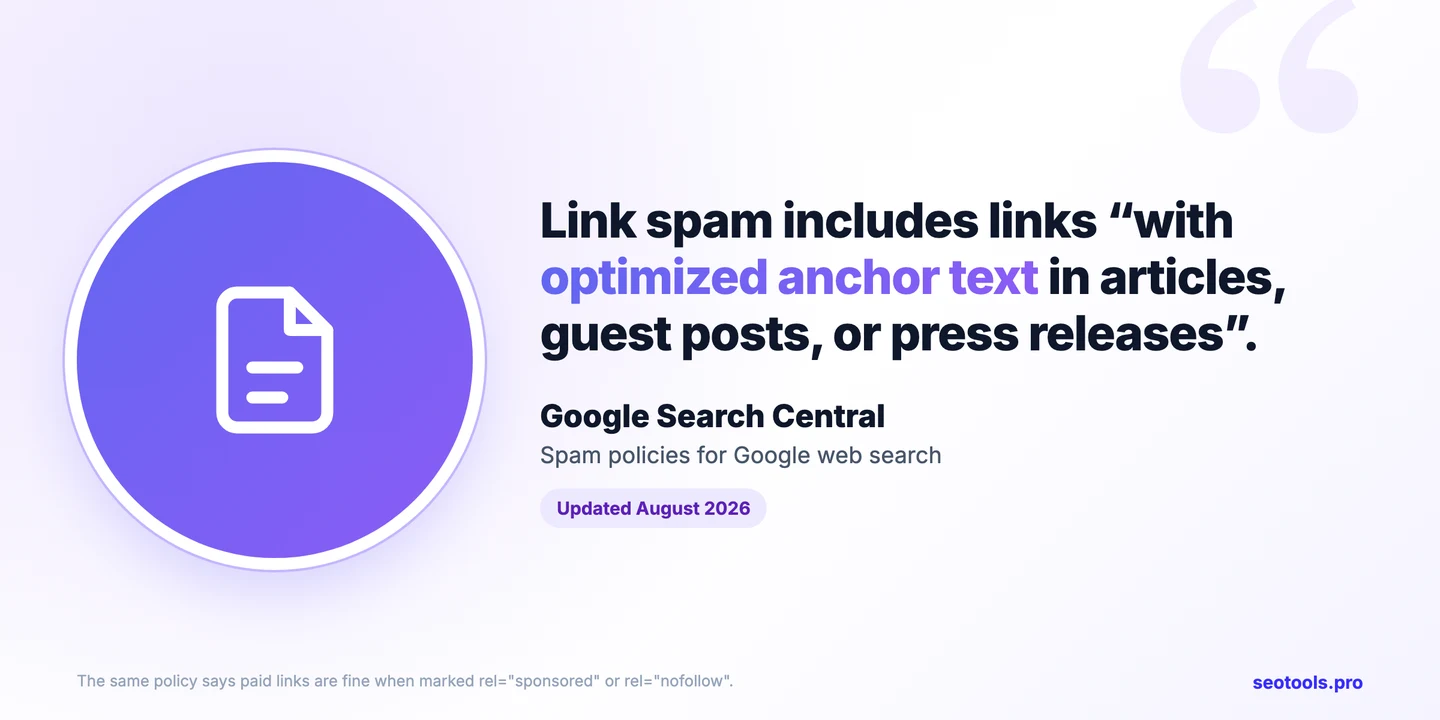
Google's spam policy lists links "with optimized anchor text in articles, guest posts, or press releases" as link spam. Its 2017 warning about guest posts pointed at the same signs: keyword-stuffed links, articles spread across many unrelated sites, and writers who don't know the topic.
The same policy says paid links are fine when they're marked with rel="sponsored" or rel="nofollow". So the safe path is simple. Pick relevant sites with real readers, and keep your anchor text natural.
See traffic, DR and backlinks for 3 sites at once, so you know which one deserves your link.
- Organic traffic for each site
- DR and referring domains
- Free to try
The Verdict
If you want a link that starts working soon, pick a link insertion on a page that already ranks for your topic. It's already found, already indexed and already trusted. Just expect to pay more for it on busy sites.
If no page fits, or you want to tell a full story, pick a guest post. It's slower to start, but you control everything, and on busy sites it's often the cheaper option.
The smartest plans use both. Start with insertions on pages that already rank, so you see movement sooner. Add guest posts for topics where no good page exists yet. On seotools.pro you can see both prices for every site side by side, check which pages rank with Topic match, and order everything in one checkout.
FAQ
Does a link insertion rank faster than a guest post?
Usually, yes. A link insertion goes on a page Google has already indexed and trusts, and that may already get traffic. A guest post is a new page that Google has to find, index and learn to trust first.
How long does it take for a new backlink to work?
There's no fixed time. Google's John Mueller says links are processed continuously, so a link can count as soon as Google sees it. But seeing a ranking change often takes weeks or months, and it depends on the page the link is on and how strong your competitors are.
Are link insertions cheaper than guest posts?
Not on the same site. On the sites in the seotools.pro catalog that sell both, the insertion cost more 54% of the time. The median was $127 for an insertion and $108 for a guest post, and the gap grows on busier sites.
What is a niche edit?
It's another name for a link insertion: your link added to an article that's already live on someone else's site.
Is guest posting dead?
No. Google's Matt Cutts said in 2014 that guest blogging "is done", but he quickly added that he meant spammy guest posting. Good articles on relevant, quality sites still work. Mass-produced posts with keyword-stuffed links don't.
Are link insertions and guest posts safe?
They're as safe as the sites you pick and the way you link. Google's spam policy targets links with optimized anchor text and links made mainly to push rankings. Pick relevant sites with real traffic, write something worth reading, and keep your anchor text natural.
Should I use dofollow or nofollow links?
A dofollow link passes ranking credit to your page, and a nofollow link doesn't (or only as a hint). Google says paid links should carry rel="sponsored" or rel="nofollow". Each site on seotools.pro shows its link type, so you can choose before you order.
How do I find pages that are good for a link insertion?
Look for pages on your topic that already rank on Google and get visits. On seotools.pro, open the Link insertion tab, type up to 5 keywords into Topic match, and check 50 sites at once. You'll see each site's Google position for every keyword.
Can I order both from the same site?
Yes, if the site offers both. On seotools.pro, many sites list a guest post and a link insertion, each with its own price, and you can order both in one checkout.