Free Organic Traffic Checker
Check monthly traffic on Google for any website. See all important data in one simple report: countries, pages, traffic value and keywords.
For example:
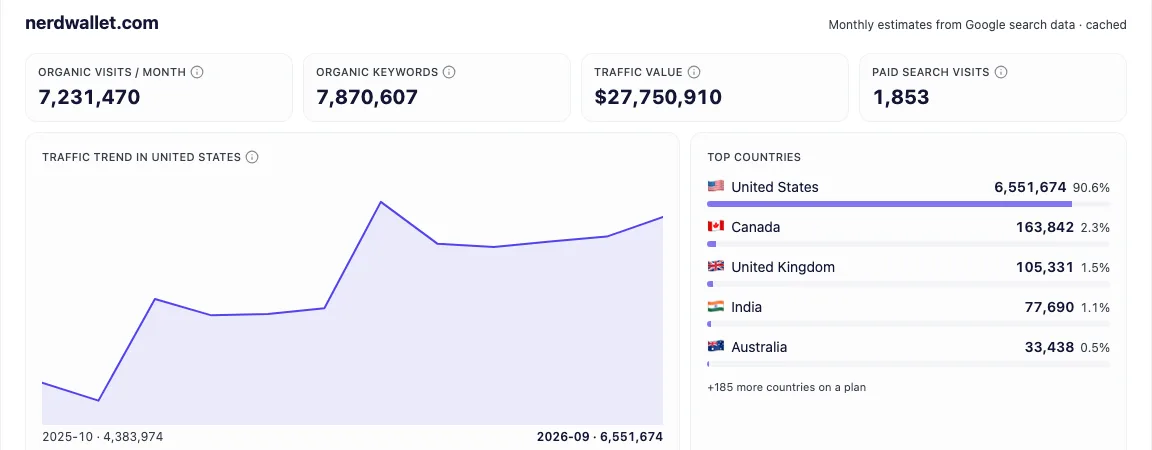
- Monthly organic visits and a 12-month trend
- Top countries and their share of traffic
- Top keywords and the pages they land on
- Traffic value and paid search visits
Trusted by 10,000+ marketers worldwide
Join the SEOs, agencies and business owners who grow their search traffic with seotools.pro.
- Happy customers
- 2,972+
- Happy customers
- Domains optimized
- 6,895+
- Domains optimized
- URLs audited
- 2.4M+
- URLs audited
- User rating
- 4.9/5
- User rating
How to check a site's organic traffic
- 1
Enter a domain
Type any domain, yours or a competitor's. A bare domain like nike.com works best.
- 2
Click Check traffic
We pull the estimate from seotools.pro search data. It takes about 10 seconds.
- 3
Read the report
Start with monthly visits and the trend, then look at the countries, keywords and pages behind them.
What's in the traffic report?
- Organic visits: estimated monthly visits from Google's organic results, all countries added up.
- Organic keywords: how many searches the site ranks for in Google's top 100.
- Traffic value: what the same clicks would cost each month as Google Ads.
- 12-month trend: monthly organic visits in the site's biggest market.
- Top countries: where the searchers are, with each country's share.
- Top keywords and pages: the searches that send the most visits and the pages they land on.
Why check organic traffic?
- Size up competitors. See how much Google traffic a rival gets before you plan against them.
- Find what works. Their top pages and keywords show which topics pull visits.
- Spot drops early. A falling trend often lines up with a Google update.
- Check a prospect or partner. Know a site's reach before a call or a deal.
- Plan your budget. Traffic value shows what the same visits would cost as ads.
- Pick the right markets. Top countries show where demand for a site already exists.
Where does website traffic come from?
Visitors reach a website through a handful of doors. Organic search is people clicking a normal Google result. Paid search is people clicking an ad. Direct is people typing the address or using a bookmark. Referral traffic comes from links on other sites, and social traffic comes from posts on social networks.
This checker focuses on the first door, organic search, and shows paid search visits next to it. For most businesses organic search is the biggest free source of new visitors, and it's the one you can grow steadily with good pages.
Organic traffic also keeps coming after you stop paying. An ad stops sending visitors the day the budget runs out. A page that ranks well can bring visits for years.
- Organic search
- Paid search
- Direct
- Referral
- Social
Google position
How rankings turn into traffic
Traffic isn't spread evenly across Google's first page. The top result gets the biggest share of clicks, and every step down gets fewer. By position 10, only a small slice of searchers click.
That's why moving a page from position 8 to position 3 can multiply its traffic, while the keyword's search volume stays the same. It's also why the estimate in this report weighs each keyword by the position the site holds.
When you look at a competitor's top keywords, check the Position column. Keywords where they rank 4 to 10 are often the easiest to win, because the top spots are close and still bring plenty of clicks.
Traffic checker vs Google Analytics vs Search Console
Google Analytics and Google Search Console show real numbers, but only for sites you own. An organic traffic checker shows estimates for any site, including your competitors. Use them together: your own tools for exact counts, the checker to see where you stand against others.
The table shows what each one is best at.
| seotools.pro traffic checker | Google Analytics | Google Search Console | |
|---|---|---|---|
| Works on any website | Yes | Only your sites | Only your sites |
| Needs access to the site | No | Yes | Yes |
| Type of numbers | Estimates | Real visits | Real clicks |
| Shows search keywords | Yes | No | Yes |
| Shows traffic by country | Yes | Yes | Yes |
| Compare with competitors | Yes | No | No |
| Price | 3 free checks a day | Free | Free |
Which metrics matter most?
The same report, read by 4 roles:
SEO
Organic visits, top keywords and the trend show where to focus your next updates.
Content marketing
Top pages and keywords show which topics perform best.
PPC and paid media
Traffic value and paid search visits show what the market pays for clicks.
Sales and partnerships
Total traffic and top countries show a prospect's reach and market.
Checking traffic isn't enough.
Turn the numbers into next steps.
What can you learn from the traffic data?
Organic traffic shows how much of a site's audience comes from Google, and what earns it. Four things stand out:
How your traffic compares
Put your monthly visits next to a competitor's to see who wins more of the search demand in your market.
Which pages do the work
Most sites get the bulk of their Google traffic from a small group of pages. The top pages list shows which ones.
Which searches bring people in
The top keywords show the exact searches behind the visits, with the position the site holds for each one.
Where the audience lives
Top countries show which markets a site really serves, which can differ from the markets it targets.
How much organic traffic is good?
There is no single good number. A local plumber may need a few hundred visits a month, while a national store may need hundreds of thousands.
The better question is whether the traffic is steady and whether it brings the right people. A flat or rising trend over 12 months is a healthier sign than one big spike.
Compare yourself with sites that sell to the same people, not with the biggest names in your industry. If similar sites get far more traffic than you, that gap is your opportunity.
Watch the trend more than the total. A slow decline often means pages are losing positions, and it is cheaper to fix early.
Steady growth
Visits rise month by month. Rankings are holding.
Spiky or falling
Big swings or a slide. Check for lost positions or a Google update.
3 traffic patterns to recognize
The 12-month trend tells you more than the total. Most sites follow one of these shapes:
Steady growth
A line that climbs month by month. The site is adding pages that rank, or its pages are moving up. Keep doing what works.
Seasonal waves
Peaks and dips that repeat at the same time each year, like a gift shop in December. Compare each month with the same month last year, not with the month before.
Sudden drop
A sharp fall in one or two months. It often matches a Google update, a site move or pages removed by mistake. Find out what changed that month.
Why organic traffic drops
If the trend points down, one of these is usually behind it:
A Google update
Google changes how it ranks pages several times a year. Some sites win and some lose. Check whether the drop lines up with a known update.
Lost positions
Competitors publish better pages and push yours down a few spots. Even a small slide on page 1 can cut clicks a lot.
Technical problems
Broken pages, a blocked crawler or a slow site can make pages drop out of results. A site audit finds these fast.
A site move or redesign
Changing URLs without redirects throws away the rankings the old pages earned.
Seasonal demand
Some topics are simply searched less at certain times of year. Compare with the same month last year before you worry.
AI answers and new result types
AI summaries and other features at the top of Google can answer the question before anyone clicks. Pages that answer simple questions feel this most.
How to increase your organic traffic
Once you know where you stand, these are the usual next steps:
Write for searches people already make
Use keyword research to find topics with real search volume, then answer them better than the pages ranking now.
Improve the pages you already have
Update pages that rank on page 2. Fresh facts, clearer headings and better internal links often move them up.
Fix technical problems
Broken pages, slow loading and missing tags hold good content back. A site audit finds them.
Earn links from trusted sites
Links from relevant sites still help pages rank. Study who links to the competitors that win.
Track what changes
Check your positions and traffic every month so you can see which changes paid off.
The organic traffic checker is the first step: it shows where you stand, so you can pick the right next move.
How to analyze a competitor's traffic in 5 steps
A simple routine you can repeat for every competitor:
- 1
Check their total
Enter their domain and note the monthly organic visits and the trend. Is it growing, flat or falling?
- 2
Find their best pages
Look at the top pages. These are the topics and page types that pull most of their Google traffic.
- 3
Read their keywords
Check which searches send those visits and where they rank. Note the keywords you have no page for.
- 4
Compare markets
Look at their top countries. A competitor strong in a market you ignore can show you a new opportunity.
- 5
Plan your pages
Pick the gaps with the most traffic and write better pages for them. Check again next month to see what moved.
- 1 Check a competitor's traffic
- 2 Find the pages that win
- 3 Write or improve your version
- 4 Track the change
From traffic data to results
Say you run a small accounting firm, and a rival keeps showing up above you on Google.
You check their domain and see that most of their organic traffic comes from 3 guides, each one answering a common tax question.
You look at the keywords behind those guides and notice you have no page for 2 of those questions at all.
You write clear, up-to-date answers, link them from your service pages, and check your traffic again next month to see what moved.
That is the whole loop: check, compare, act, and measure again.
How we estimate organic traffic
These numbers are estimates, not analytics. They come from seotools.pro search data, which updates monthly.
For every keyword a site ranks for, the model takes its monthly search volume and the share of clicks its position usually gets, then adds them up.
Expect them to differ from Google Analytics, most of all for small sites and brand searches.
The estimate covers organic Google search only. It leaves out ads, social media, email and direct visits, which is one more reason the totals differ from your analytics.
Organic traffic glossary
- Organic traffic
- Visits that come from clicking a normal, unpaid search result.
- Paid traffic
- Visits that come from clicking a search ad.
- Organic keywords
- The searches a site ranks for in Google's top 100 results.
- Position
- Where a page appears in Google for a search. Position 1 is the first result.
- Search volume
- How many times people search for a keyword each month, on average.
- Traffic value
- What the same organic clicks would cost if you bought them as Google Ads.
- Top market
- The country that sends a site the most organic visits.
- Traffic share
- The part of a site's total visits that one page or one country brings in.