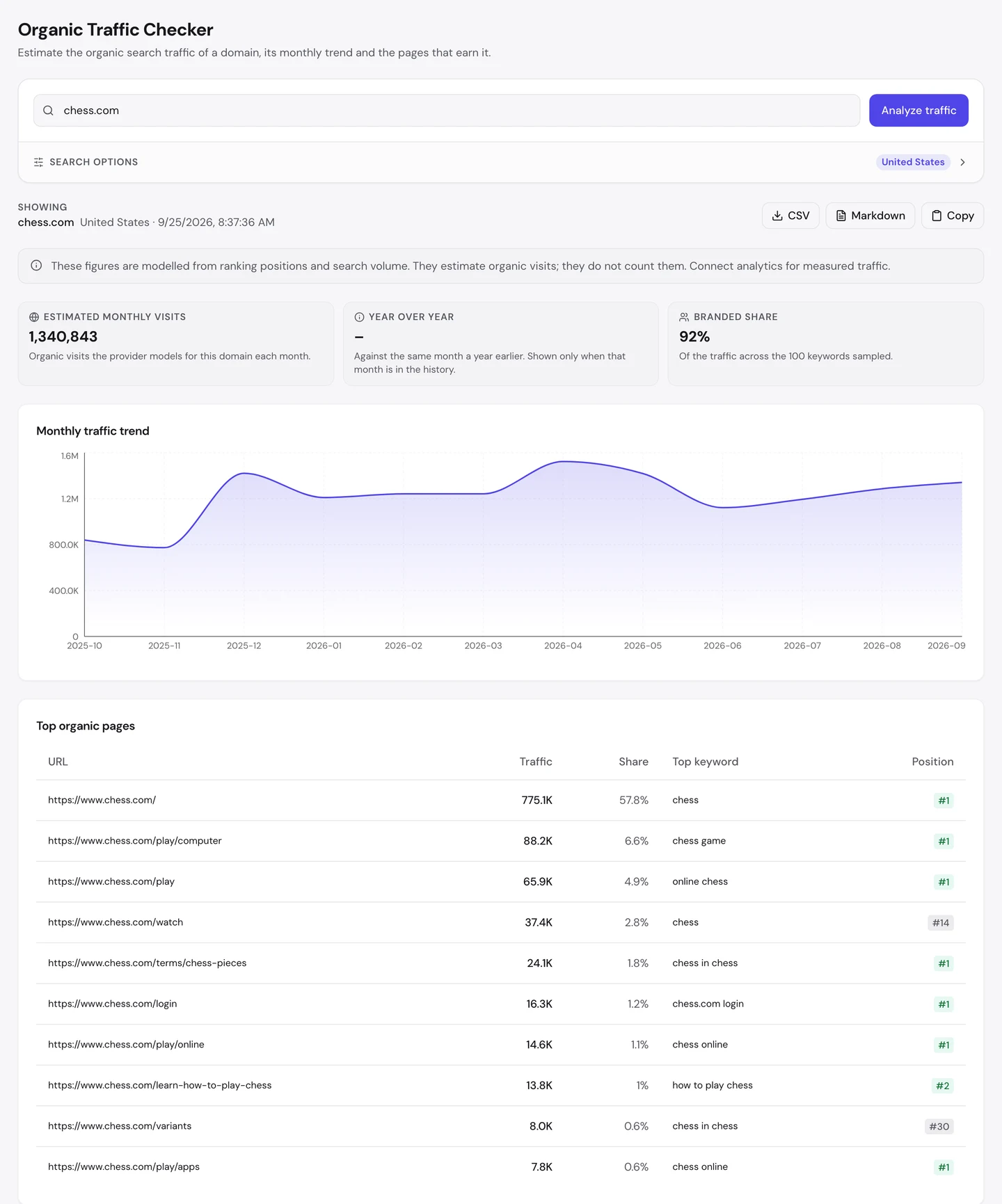
Chess.com gets 1.3M visits a month from Google in the US alone, and more than half of them come from people typing one simple word: chess.
Its homepage ranks first for that word. It brings in about 58% of the site's search traffic on its own.
To find out how, we ran chess.com through our whole SEO toolkit: traffic, keywords, rivals, links, speed, AI search and a full site audit.
Here are 9 lessons you can copy, plus the one thing you can't.
Own the word people type
We started with our Organic Traffic Checker. It estimates a site's organic traffic, meaning the people who find it on Google without ads.
The answer was about 1.3M visits a month in the US.
Then we opened the Keywords tab of our Website Audit. It lists every search a site ranks for, with its Google position, how often people search it and how many visits it sends.
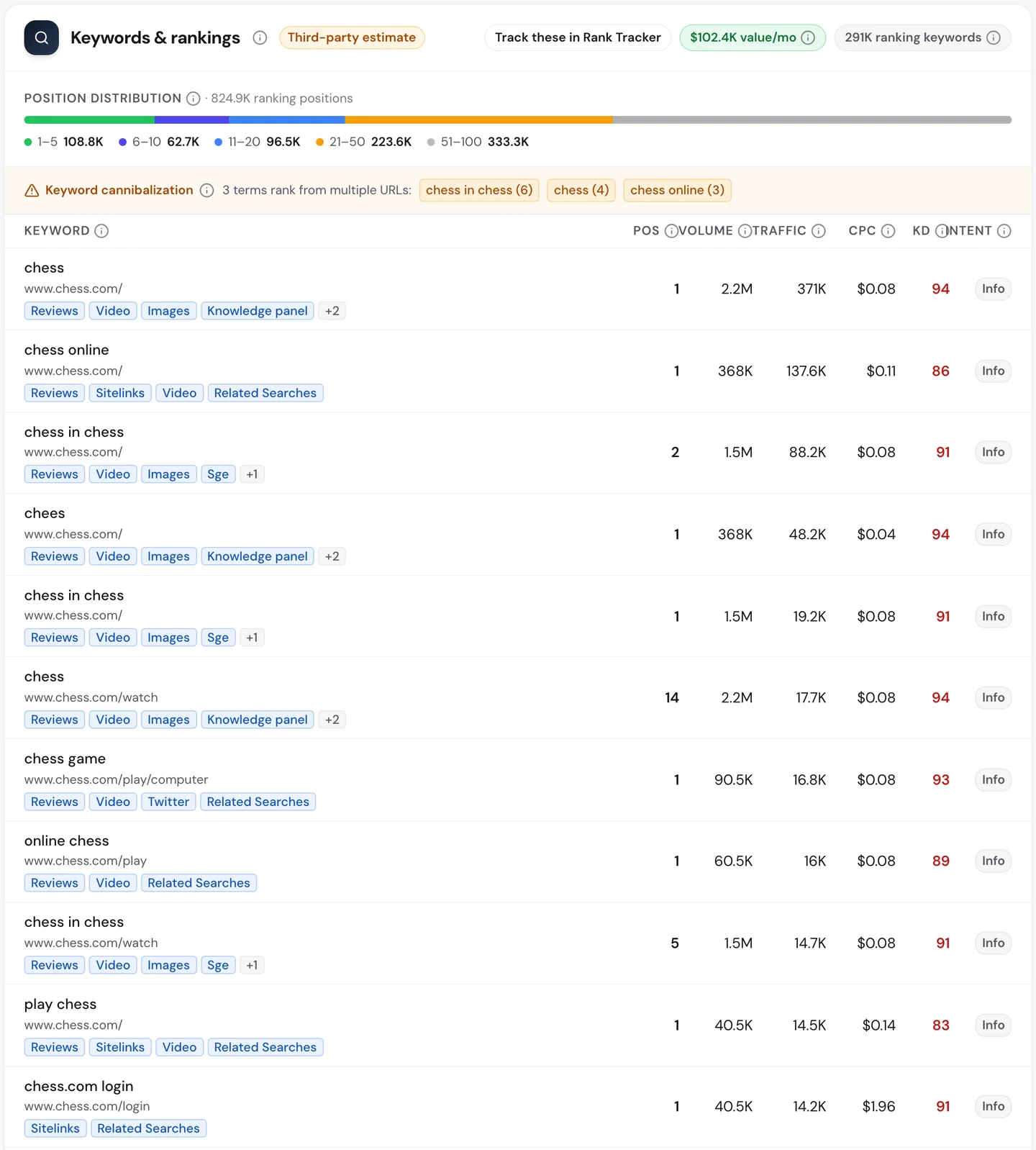
The biggest pages rank first for the plainest searches there are: "chess", "chess online" and "play chess". Nobody has to know the brand to land there.
It was planned from the start. In 2005, the founders bought the chess.com domain at an auction for $55K, according to Deseret News.
They launched in 2007 with no investors. Today the homepage greets visitors with one clear promise.
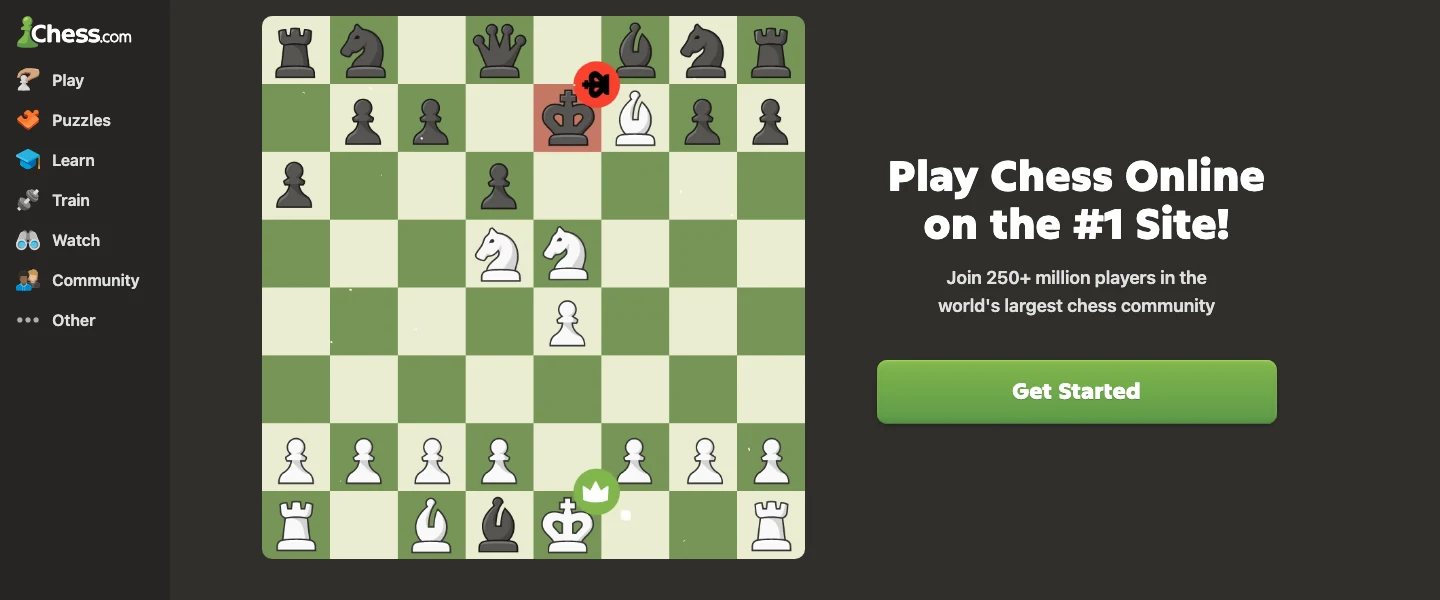
You probably can't buy your category's name. But you can find the plain word nearest to what you sell, and make one page the best answer to it.
Calculator.net, a free calculator site we studied on its own, did the same thing with the word "calculator".
It also helps to know who you're up against. The audit's Competitors tab finds the sites that rank for the same searches as you, and the words they win that you don't.
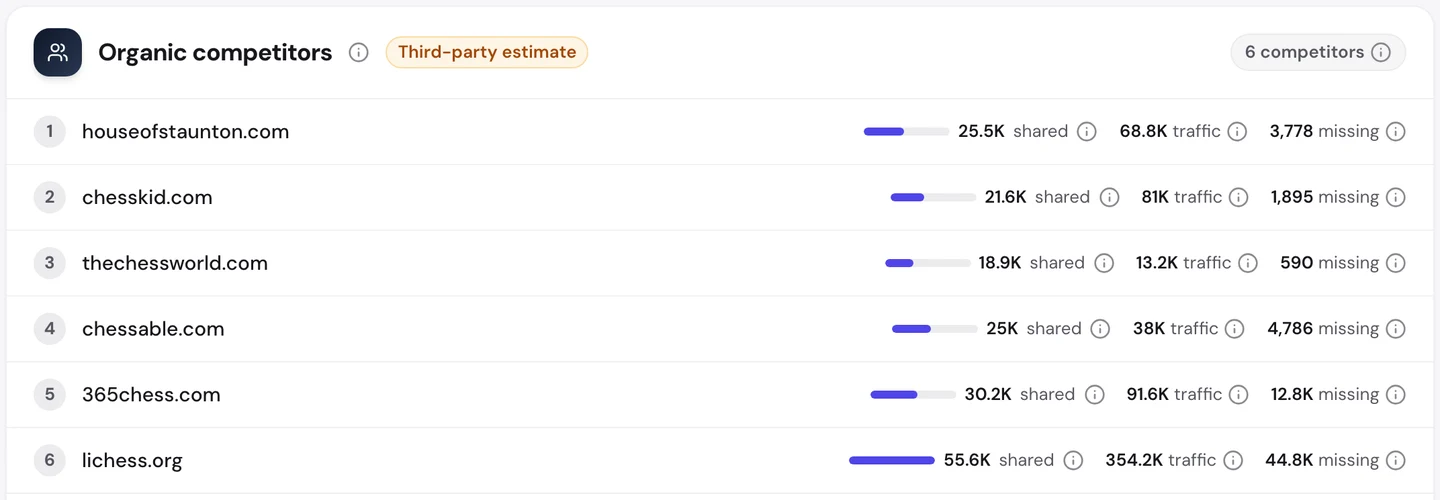
Lichess is free and popular with strong players, and it shares more searches with chess.com than any other site. Yet it gets about a quarter of the visits.
So ranking for the same words as your rival isn't enough. Owning the top spot for the biggest one is what counts.
There's a catch, though. When one page carries half your traffic, one bad week for that page hurts the whole site.
So watch that page's position, not just your total. Put it in our Rank Tracker, which checks where your pages sit on Google and shows you the moment one starts to slide.
Chess.com gets most of its search traffic from one page that ranks first for the word "chess". Finding the plain word nearest to what you sell, then winning it, is a clear job with a clear finish line.
- We find the word your buyers type instead of your name
- We build the page that deserves to rank for it
- We track it weekly and defend it
- SEO and GEO, so AI answers quote you too
Turn searchers into regulars
Here's the part most sites miss. Search is only the front door.
Our traffic checker says 92% of chess.com's search visits come from brand searches. Most people who search already know the name, or type "chess" and mean chess.com.
Compare that with RTINGS, the product testing site we also looked at. Only 1% of its visitors search for its name.
The keyword list shows what those people are doing. "chess.com login" ranks first, and it's searched about 40K times a month.
Those aren't new visitors. They're players using Google as a shortcut back to their account, and "chess.com app" tells the same story.
That's the real win. A search brings someone in once.
A reason to come back, like a daily puzzle or a game waiting for your move, brings them back every day.
So give your first-time visitors something to return for. An account, a saved result or a weekly update all turn a search into a habit.
Then check your own keyword list for searches like "yourbrand login". When those grow, your regulars are growing too.
Build a glossary of your topic
Look at the top pages again. One of them isn't a game at all.
It's a simple page explaining the chess pieces, and it ranks first on Google.
That page is part of a glossary, a set of short pages that each explain one term. Chess.com has hundreds of them, from openings to famous engines.
These term pages drew 2.2M clicks in 2022, worldwide.
Beginners search for terms all the time. "What is castling?" "How does the knight move?" Each answer can be its own page.
Here's how to build yours.
- List every word a beginner in your field has to learn.
- Check which ones people search with our Keyword Research tool. A keyword is just a phrase people type into Google.
- Write one short page per term, with a picture or a quick example.
- Whenever a term comes up anywhere on your site, link it to its page.
That last step matters most. Chess.com trained its whole writing team to add those links, so every new article feeds the glossary.
Index only pages people search
Now the other side of chess.com: its user pages.
Most sites list their pages in a sitemap, a file that tells Google what's there. When we counted chess.com's, about 96% of its pages were player profiles.
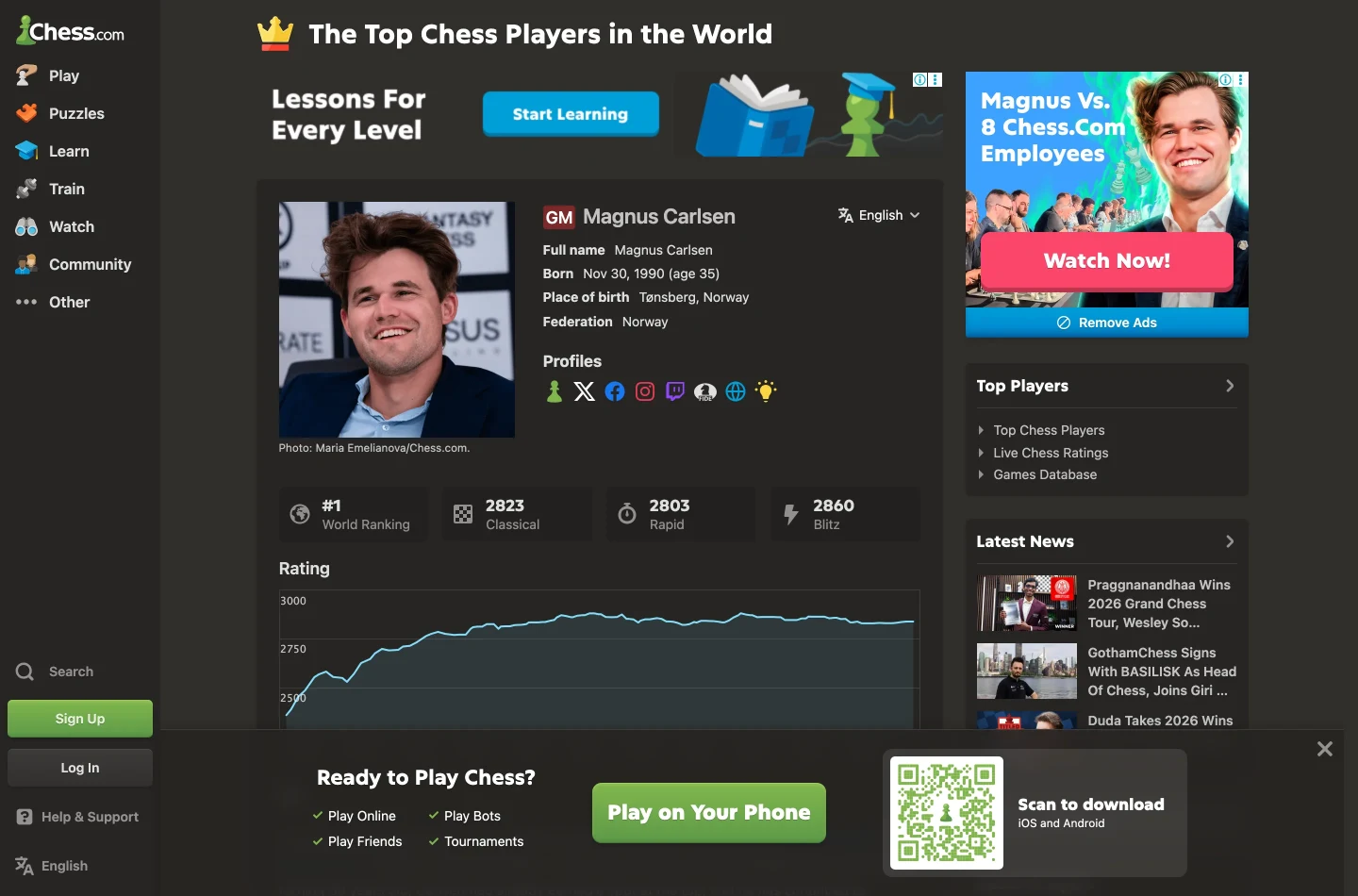
That's about 800K profiles. Not one of them shows up in the top pages we measured.
The reason is simple. Nobody searches for a player they've never heard of.
Famous players are different. Their profiles do get searched, and chess.com won extra clicks by letting Google show more of them, with better titles.
So test your own user pages before you publish them. Pick 20 names from your database and look them up in Keyword Research.
If almost none have searches, keep those pages out of Google with a noindex tag, a line of code that asks Google not to list a page. Keep the pages people do look for.
Point links at your name
Chess.com gets a lot of traffic from fairly few links.
A backlink is a link from another website to yours. Google treats each one a bit like a vote of trust.
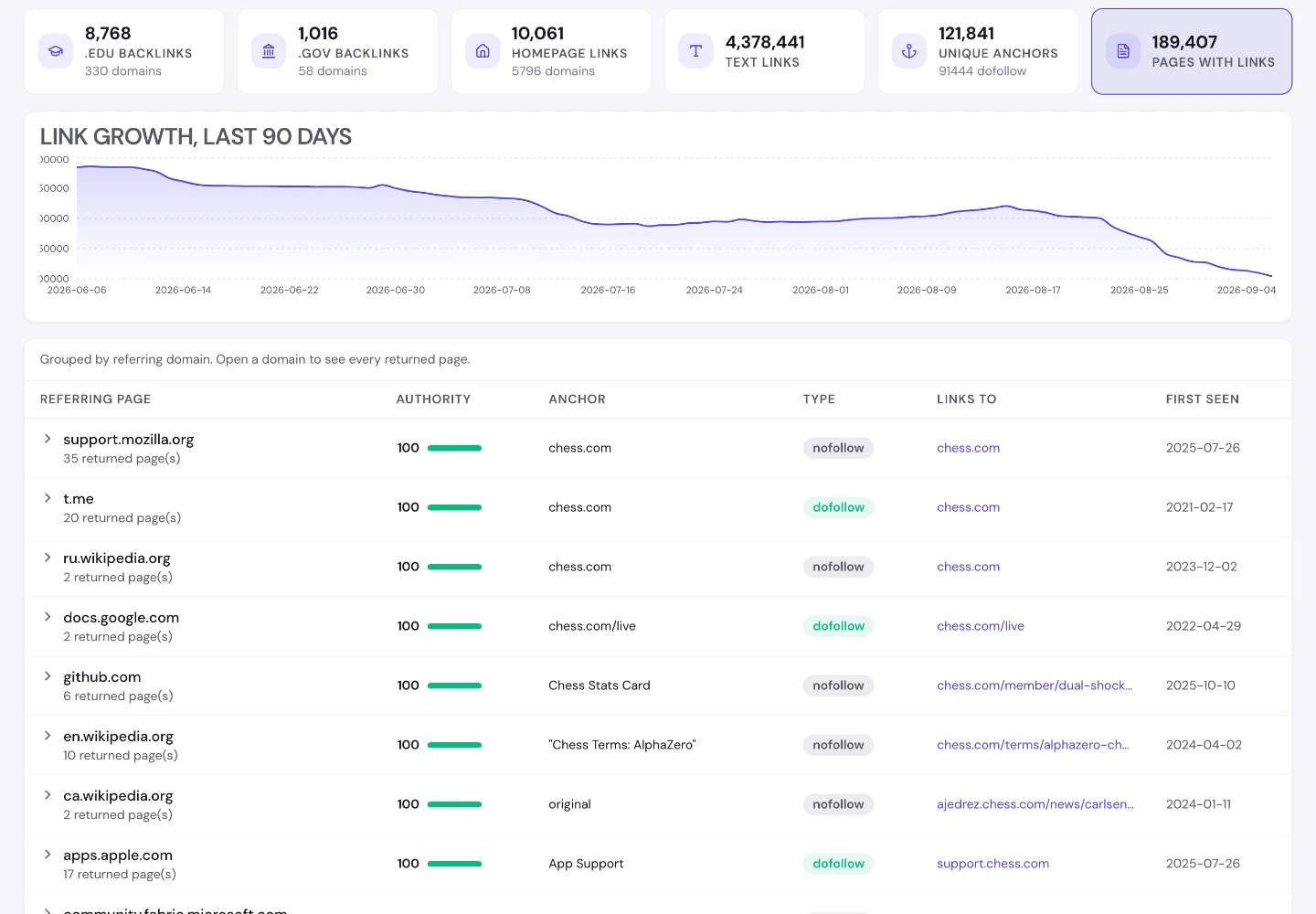
Our Backlink Analyzer found links to chess.com from about 65K different websites.
Now compare it with Dribbble, the design showcase site we studied separately. Dribbble has more than 100M links, over 10 times as many.
Yet chess.com gets about twice Dribbble's search traffic. Why?
Most of chess.com's links point at its name. Every one of them makes the brand better known, and more people search for it.
The audit's Backlinks tab shows this in the anchor text, meaning the clickable words of a link. The 2 most used anchors are simply "Chess.com" and "chess.com".
Dribbble's links mostly point at millions of separate design pages. Each of those has to win its own search, alone.
So before your next link campaign, ask where the links will point.
Links to your name add up. Links scattered across thousands of item pages mostly don't.
Audit your language tags
Chess.com's links come from sites all over the world, and so do its players. That's where our Website Audit found its biggest problem.
The US numbers above are only part of the story. The audit's Traffic tab estimates about 11M search visits a month worldwide, and India sends more of them than the US.
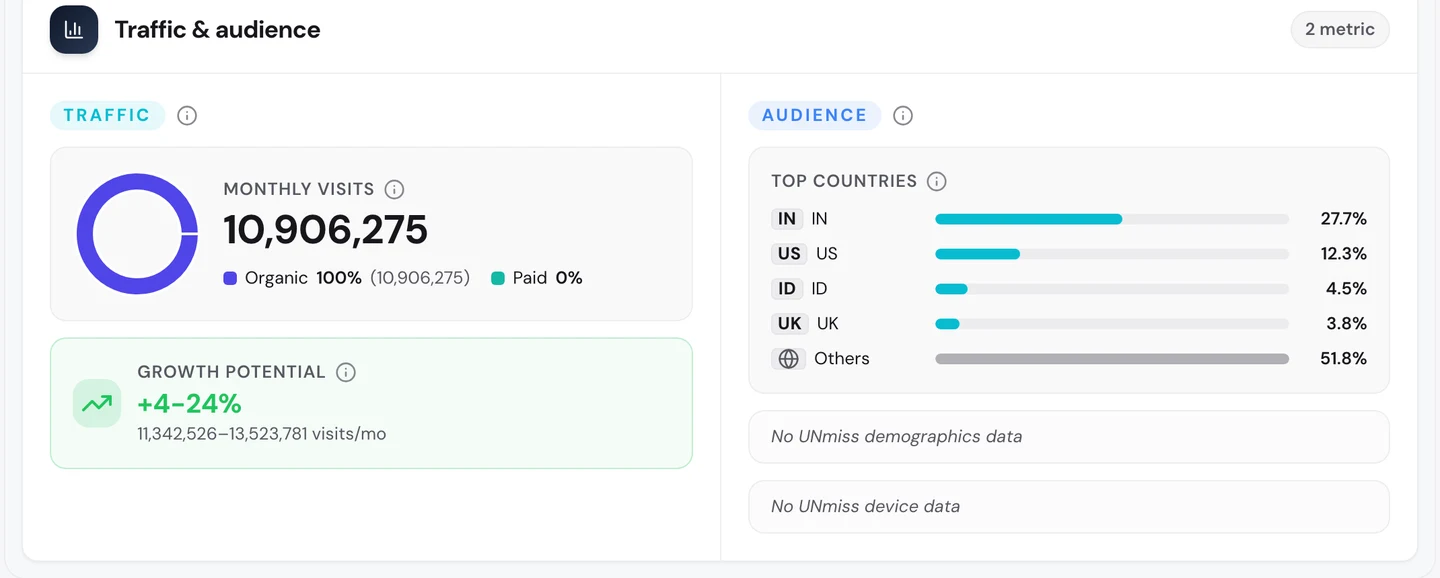
To serve all those people, chess.com runs in more than 50 languages, each on its own set of pages. That's a lot to keep tidy.
Here's how the audit checks it for you. It crawls a site the way Google does, opening each page and following its links to the next ones.
Every page it opens gets tested against a long list of checks, from titles and headings to links, speed and language tags. We had it crawl just over 250 pages of chess.com.
The site scored 84 out of 100, which the report rates as good. It has no broken links at all.
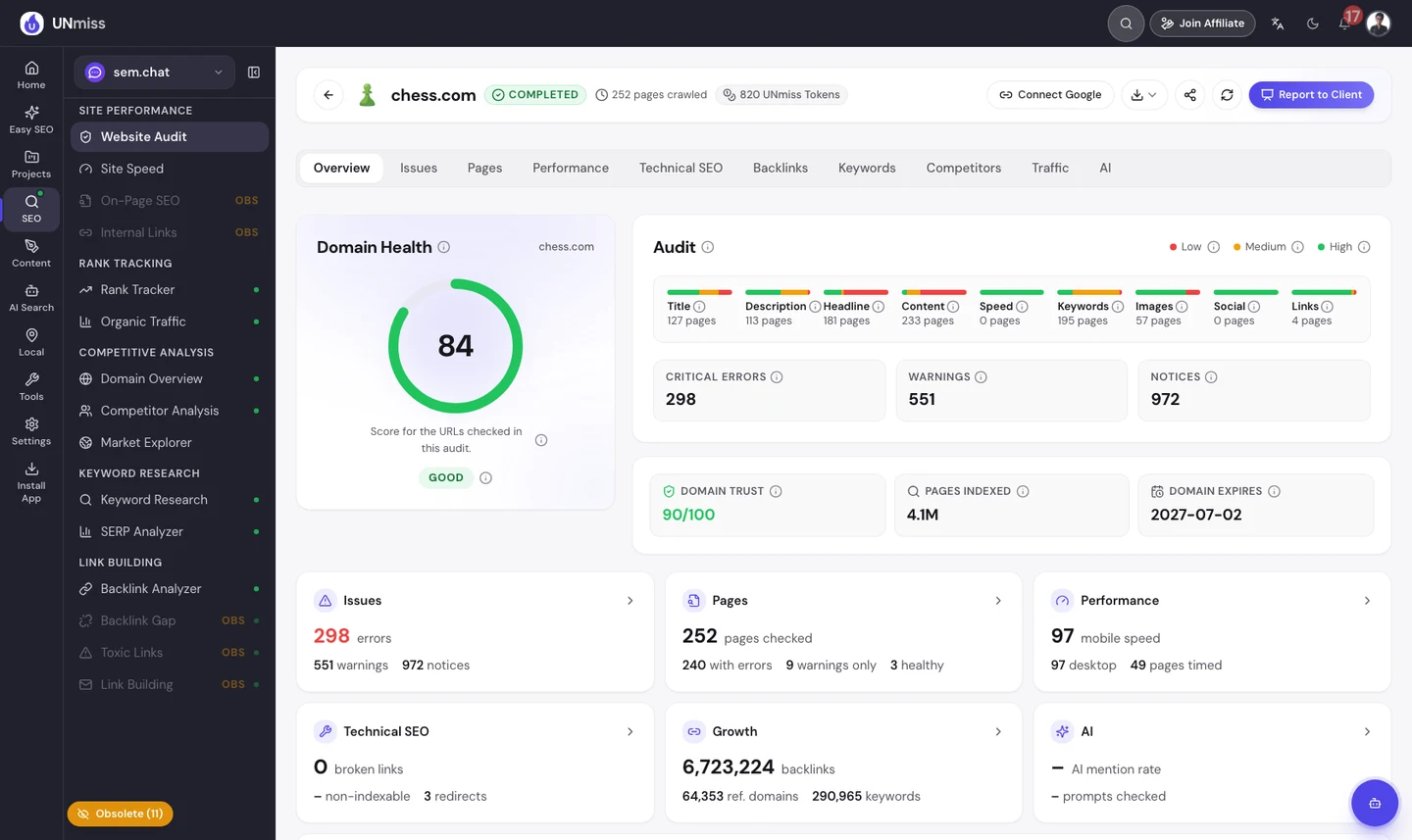
That overview is only the first of 10 tabs. Issues, Pages, Performance, Technical SEO, Backlinks, Keywords, Competitors, Traffic and AI each go deeper, so one crawl gives you the whole picture.
The Issues tab sorts every problem by how much it matters, and one issue stands out.
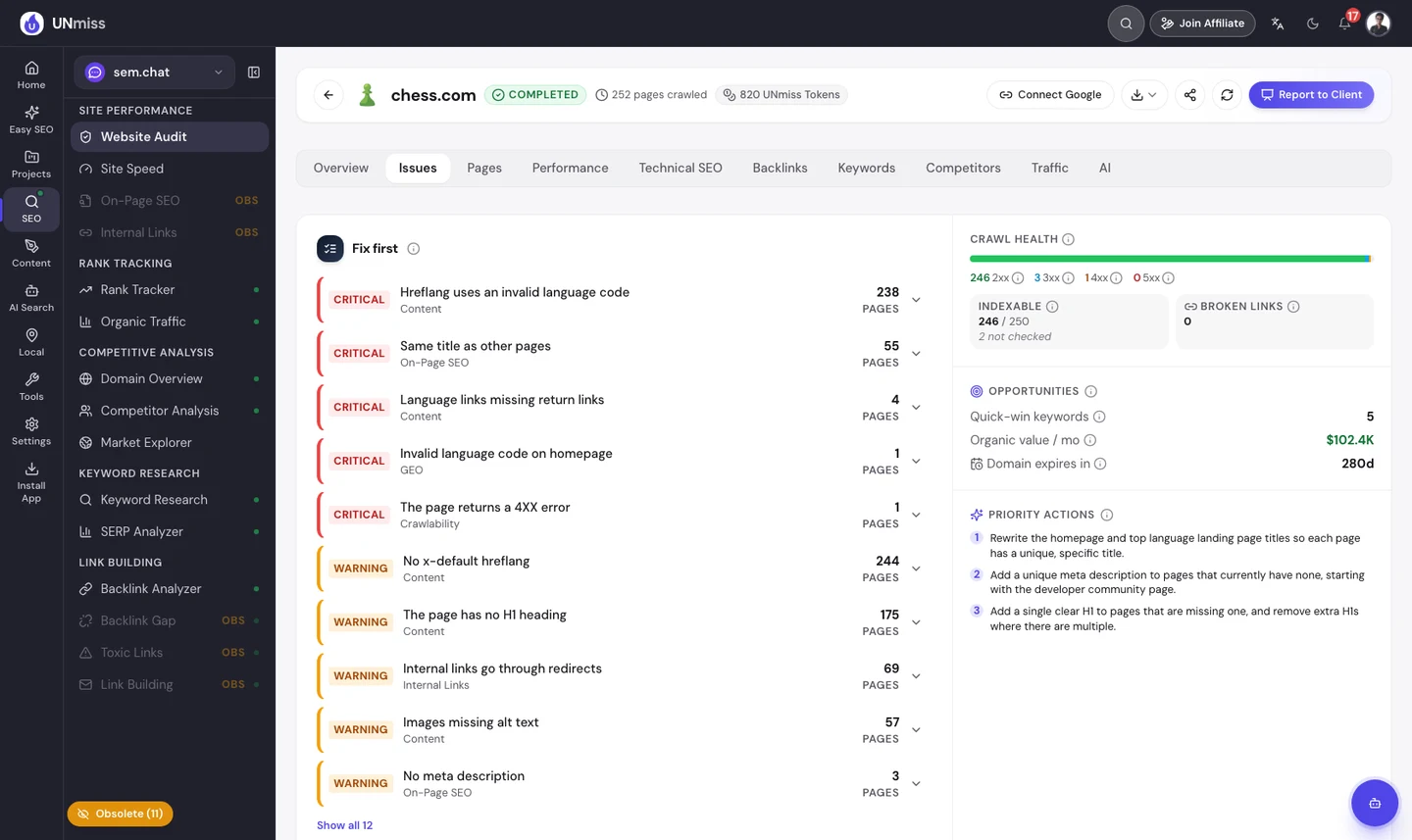
Most of the critical errors come from one thing: the language tags. These are hidden labels, called hreflang, that tell Google which language each page is in.
On more than 200 pages, one of those labels uses a code Google doesn't accept.
Which code? Our free browser extension answers that in one click, right on chess.com's homepage.
Open the page, click the seotools.pro icon, and a panel opens beside it. Its Hreflangs tab lists every language tag the page points to, and flags the one that's wrong.
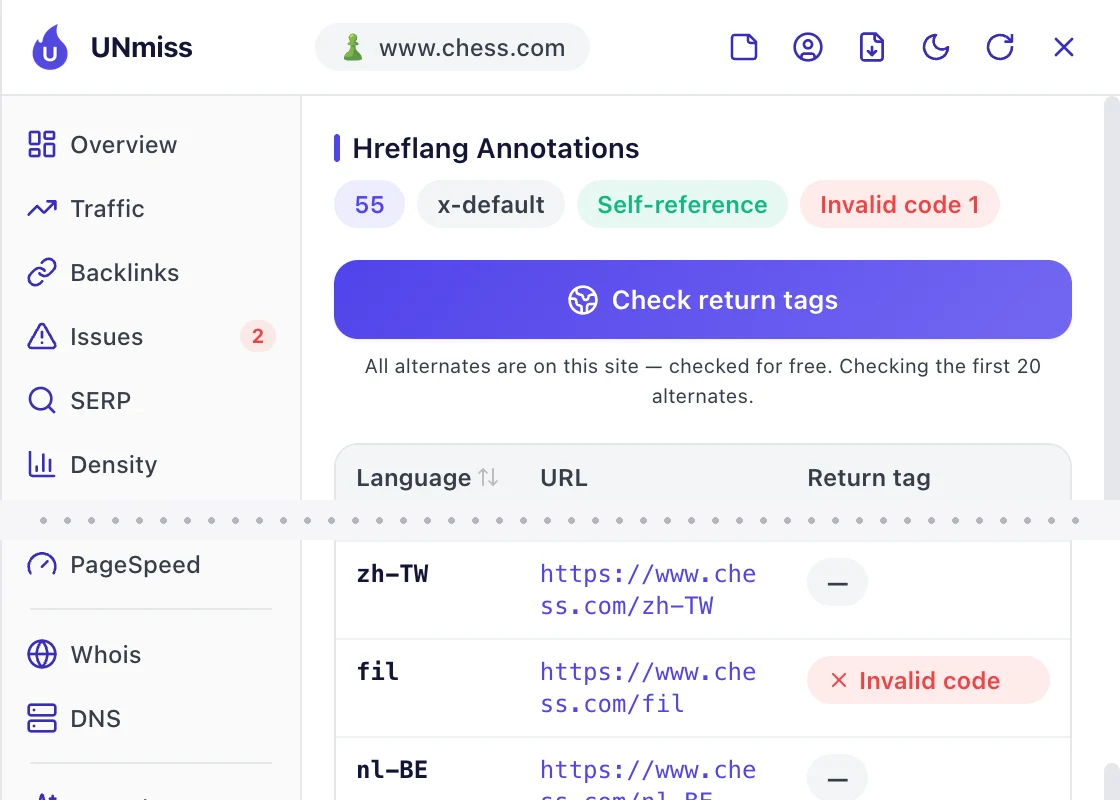
It's "fil", for Filipino. Google expects 2-letter language codes, and that one has 3.
It's one mistake, copied onto every page by a template. So it's also one fix.
The Technical SEO tab caught a second slip in the same area. Chess.com's puzzles page uses the same English title on 17 of its versions.
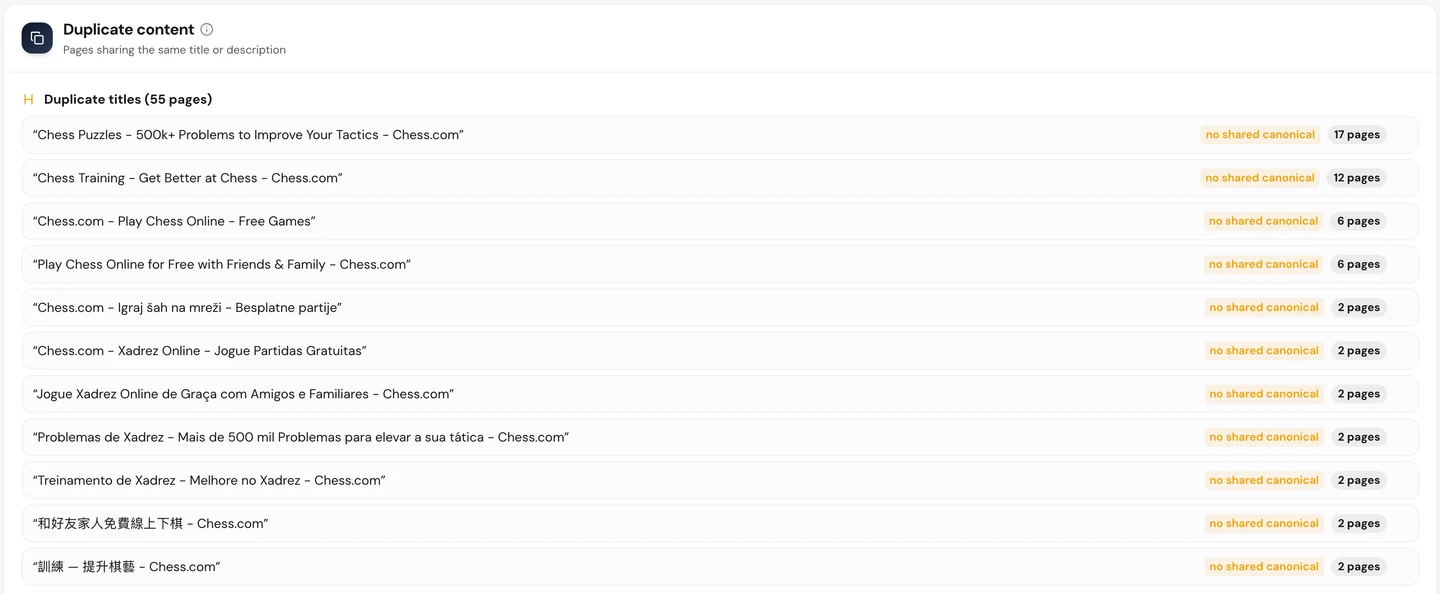
So a searcher in Belarus or South Africa can see an English title in Google, even on a page written in their own language. Translating those titles is quick, and it helps each page win clicks at home.
That's the good news with an audit like this. Hundreds of errors can shrink to a few changes once you see they share a cause.
The same extension checks the rest of the page too. It runs 35 SEO checks in one click and gives chess.com's homepage 82 out of 100.
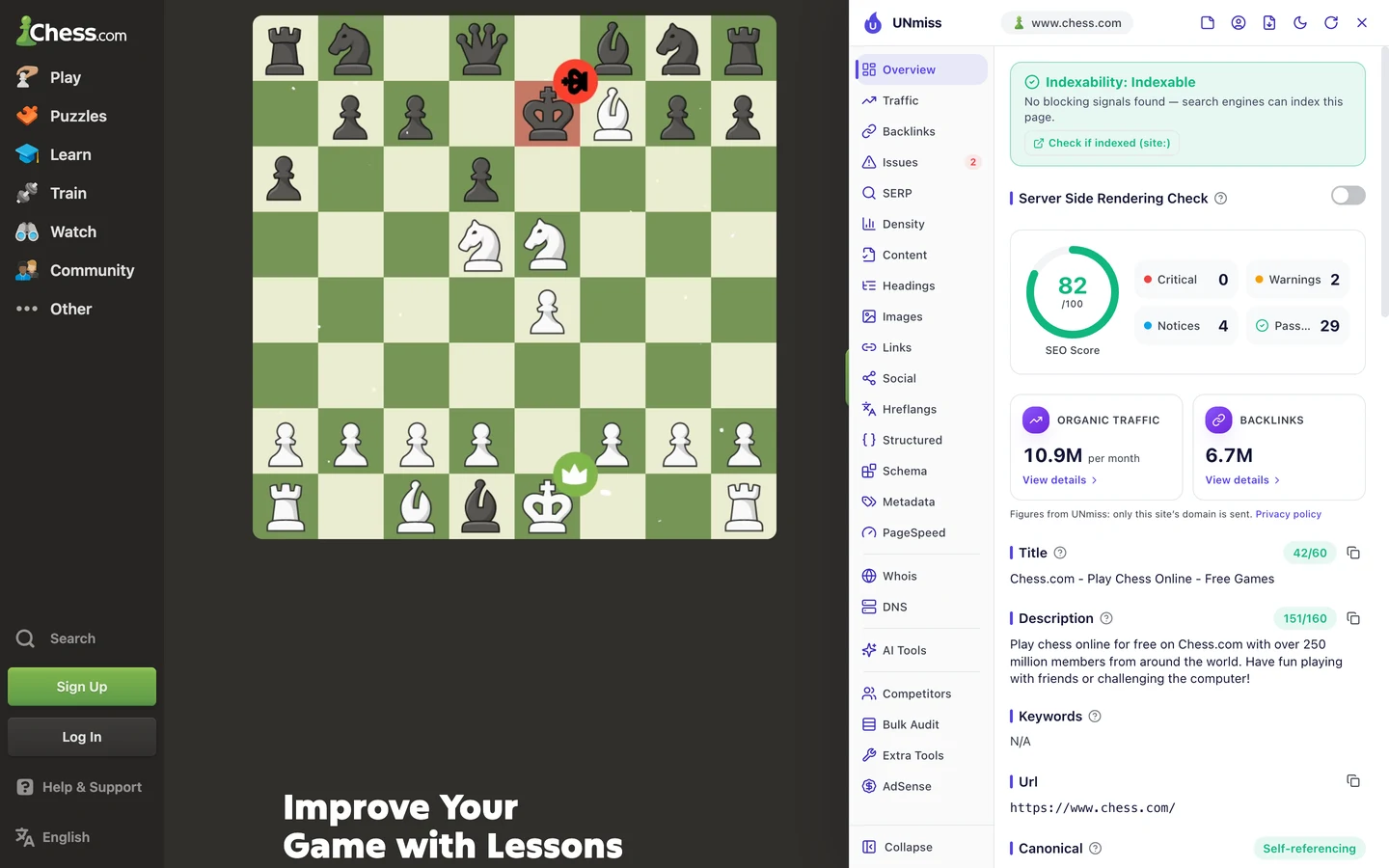
The 2 warnings are small: 13 images with no alt text, and 1 link that still uses http. Each one comes with the fix, and an AI button can write it for you.
It costs nothing and works on any page you open, yours or a rival's. Install it once, and it's ready on every site you visit.
Check speed on real phones
Speed is another tab of the same audit, and it holds a surprise.
The audit's own speed test gives chess.com 97 out of 100 on phones and desktops alike. Its server answers fast, and nothing big slows the homepage down.
The same tab then shows Core Web Vitals. These are Google's 3 checks of how fast a page loads, how fast it reacts and whether it stays still, measured on real visitors' devices.
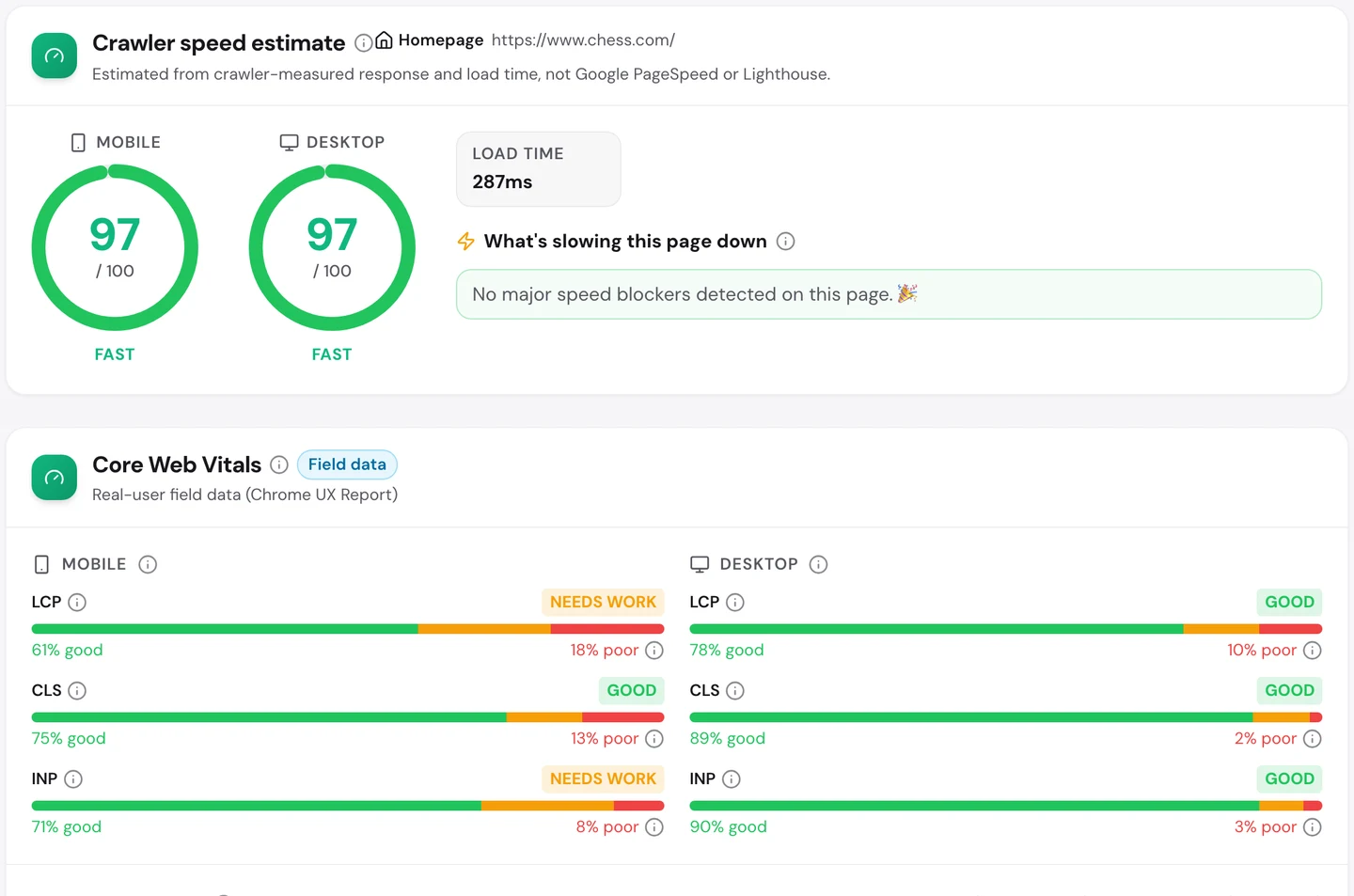
On desktop, all 3 checks pass. On phones, 2 of them need work.
The biggest gap is loading, the thing you notice first. On about 1 in 5 phone visits, the main part of the page takes too long to appear.
A fast server isn't the same as a fast phone. Phones have weaker chips and slower connections, so heavy pages take longer to draw.
So check both numbers for your own site. If real phones lag behind your test score, start with the biggest image or block at the top of your mobile pages.
To test one page at a time, run it through our Site Speed tool and fix what it flags first.
Let AI bots read your site
More and more people now ask ChatGPT or Perplexity instead of Google. So the audit also checks whether AI tools can read your site.
Those tools send crawlers, programs that visit pages and read them, much like Google's. If your robots.txt, the file that tells crawlers what they may read, blocks them, AI can't quote you.
Chess.com lets in all 12 AI crawlers the audit checks, from ChatGPT's to Claude's. Its AI Search score is 75 out of 100.
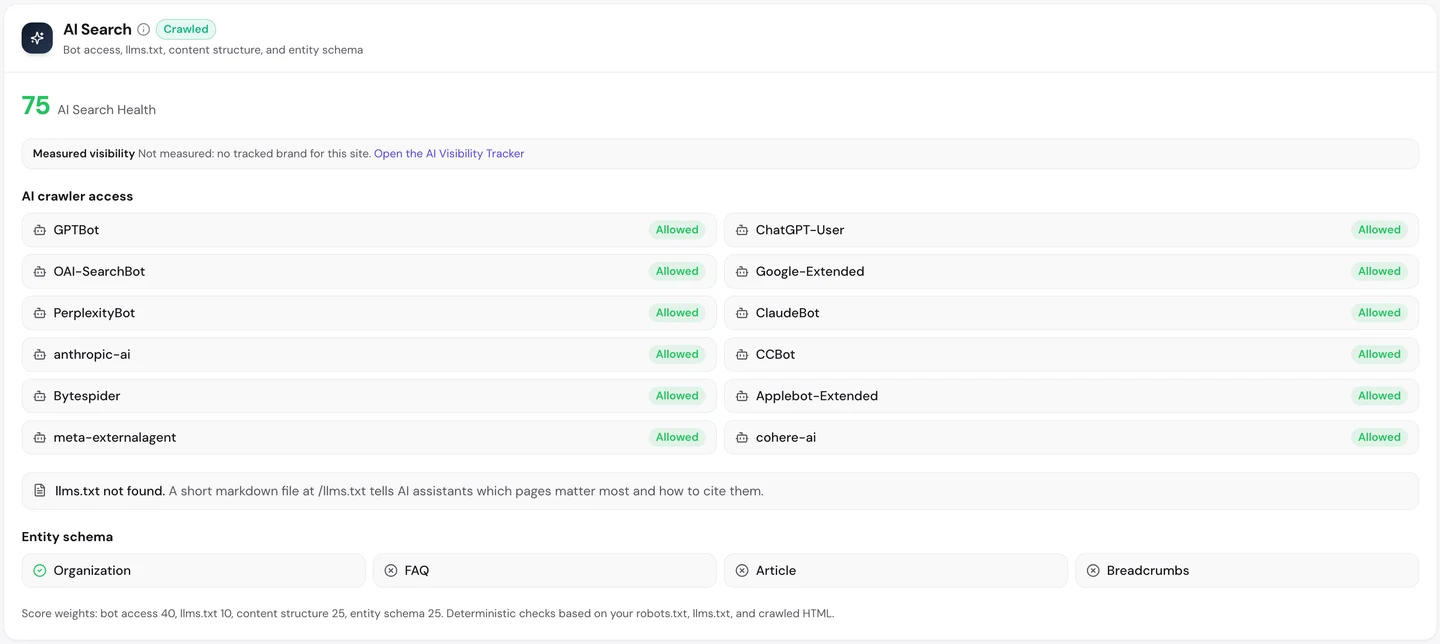
The points it loses are easy ones. There's no llms.txt, a short file that tells AI tools which pages matter most.
It also skips some schema, hidden code that tells search engines and AI what a page is, like an FAQ or an article.
Want to know if AI tools actually name your brand? Our AI Visibility Checker asks AI models your buyers' questions and shows who they recommend.
The audit's last tab ties it all together. It reads every finding and writes a 90-day plan, sorted by what to fix first.
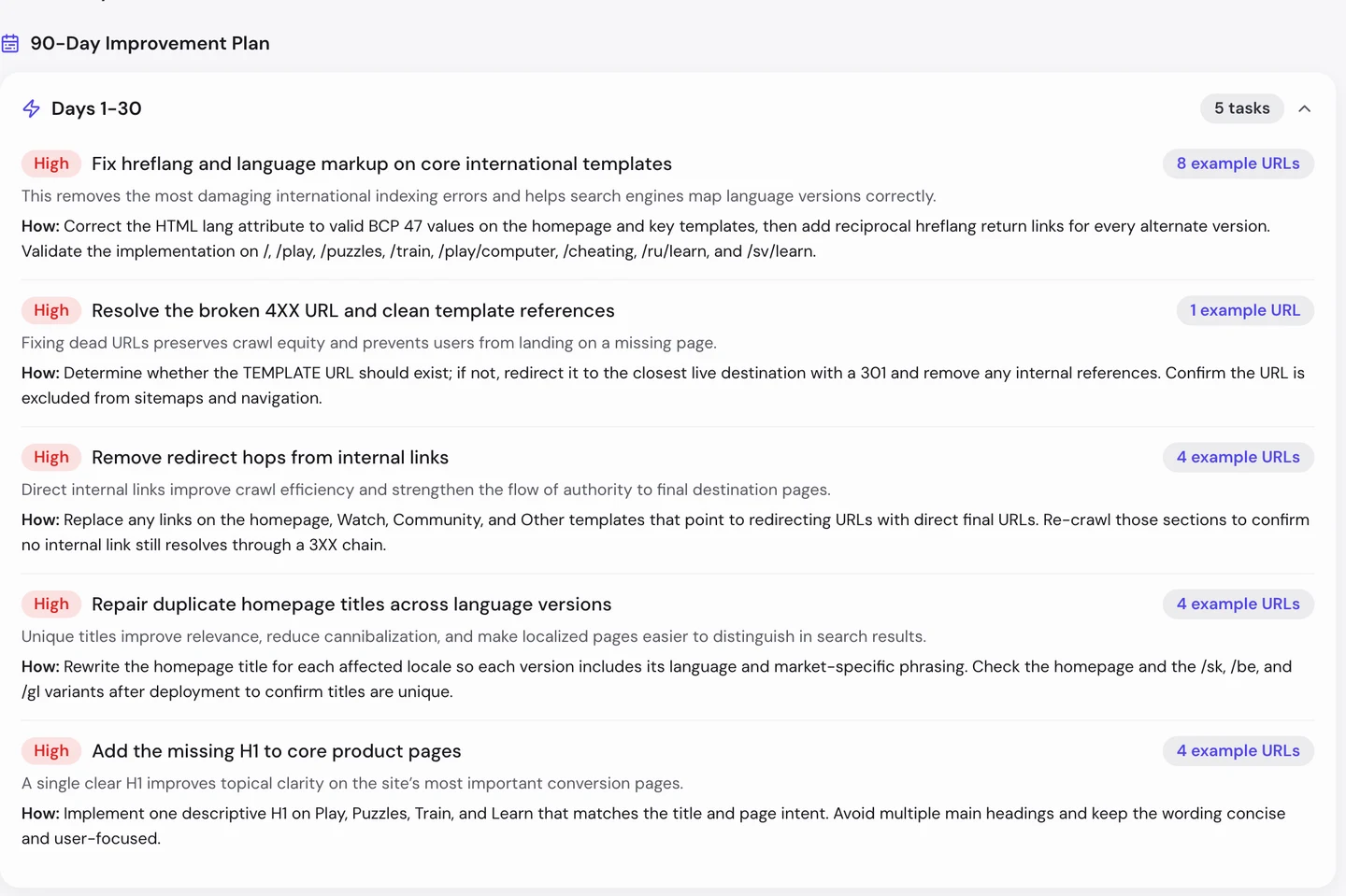
Each task tells you why it matters and how to fix it, with example pages. You can hand your plan straight to a developer.
One last number needs care, though: what all this traffic is worth.
Don't judge traffic by its ad price
Our Domain Overview shows chess.com ranking for about 290K keywords.
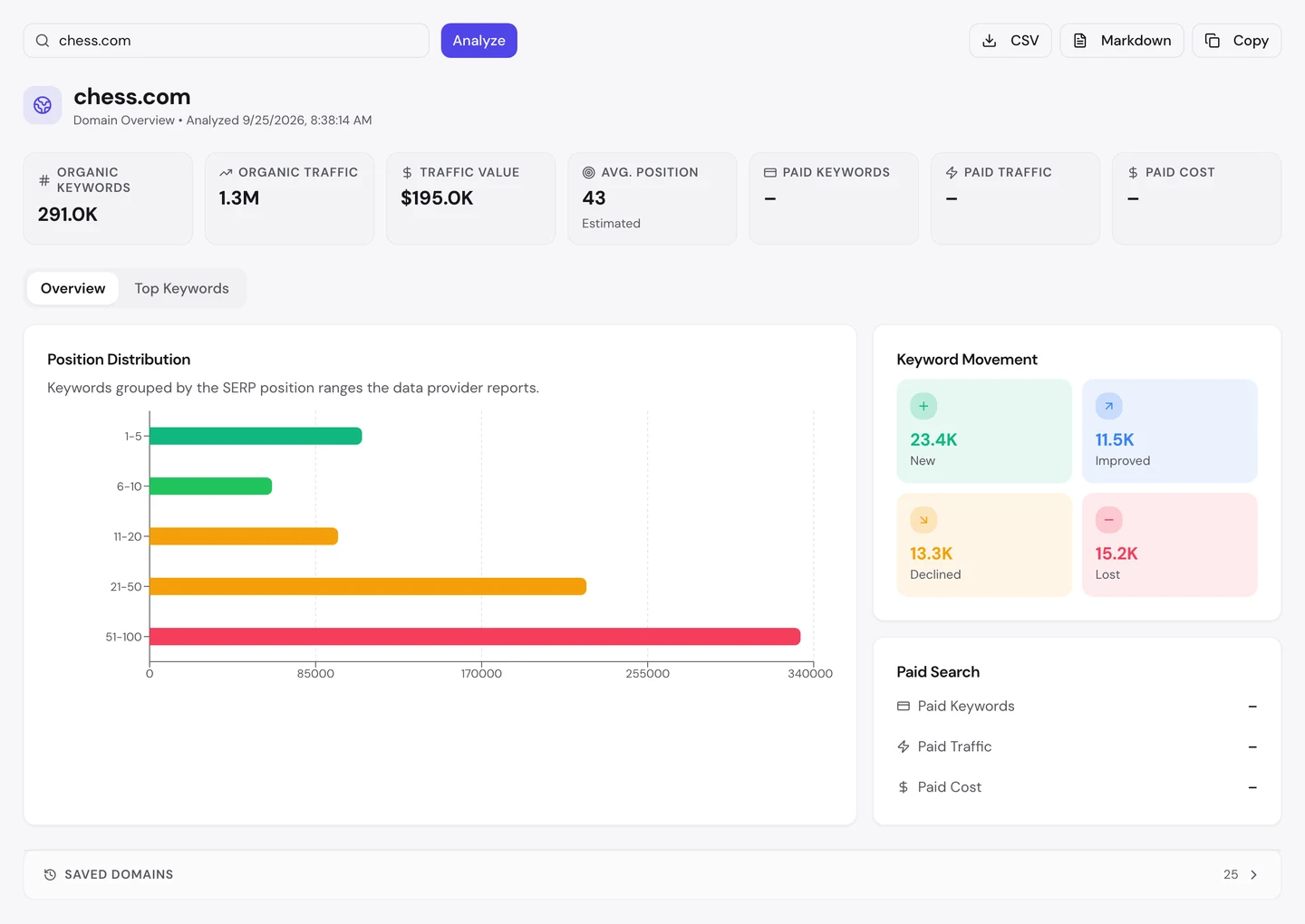
It values that traffic at about $200K a month. That's what the same visits would cost as Google ads.
It sounds low for 1.3M visits, and that's the lesson. Advertisers pay very little for the word "chess", so the tool prices those visits cheaply.
But chess.com makes money from memberships. A visitor who signs up can be worth far more than any ad click.
So if your own traffic value looks small, check your market first. A cheap keyword doesn't mean cheap visitors.
Chess.com gets 92% of its search visits from people who already know it. Our Organic Traffic Checker shows the brand share and top pages for any site, so you know which kind of site you're running.
- The same report that found one page carrying 58% of a site
- Brand share, visits and the top page for each search
- Run it on any rival's domain too
What you cannot copy
First, the part you can't copy: the word itself.
"Chess" is a plain, old word, and chess.com has owned the matching domain since 2005. Every lesson here gets easier when your name is the thing people search for.
Chess.com also got two huge boosts nobody could plan. Lockdowns in 2020 and the show "The Queen's Gambit" sent millions of new players its way.
Now a few honest notes on the numbers.
We took the traffic, keyword and site audit numbers on 25 September 2026, and the backlink screenshot on 5 September.
The 1.3M figure counts US searches only. The worldwide figure of about 11M comes from the audit's Traffic tab, and both are estimates.
The real-phone speed data is Google's own Chrome data for the last 28 days, which the audit pulls in for you.
The glossary and player-profile click figures come from a public report on chess.com's SEO, not from our tools.
The profile count comes from our count of chess.com's sitemaps on 25 September 2026, and a sitemap can list pages Google never shows.
The one number to take away
92%.
That's the share of chess.com's search visits that come from people who already know its name. Google opened the door once, and the players kept coming back.
That's the goal for any site. Win the search, then give people a reason to come back by name.
Found a word your buyers type that you could own? That could be your front door.
You can run every one of these checks on your own site, and on your rivals', and see the same numbers for yourself.
Frequently asked questions
Can a new site still rank for a one-word search like "chess"?
Rarely. One-word searches go to sites with years of trust and huge brand searches behind them. A new site does better with longer searches first, like "chess puzzles for beginners", and works up from there.
Is it worth paying a lot for a domain that matches my category?
It helps people remember you, but it won't rank on its own. Google cut back the boost for exact-match domains years ago. Chess.com ranks because its page answers the search better than anyone else's.
Should every user on my site get a public profile page?
Give everyone a profile, but only let Google show the ones people search for. A noindex tag keeps the rest out of search results while they still work for your users.
How long should a glossary page be?
As short as the answer allows. Give the plain definition first, then an example or picture, then links to related terms. A beginner should get the answer in the first few lines.
What are hreflang tags, and do I need them?
They're hidden labels that tell Google which language and country each page is for. You only need them if your site has the same pages in more than one language. Use Google's standard codes, and make every language version point to all the others.
How often should I run a site audit?
Once a month suits most sites, plus once after every launch or redesign. Rerun it after any template change too, since one edit there reaches every page built from it.
Do links from Wikipedia help, even when they're nofollow?
They don't pass Google trust the way normal links do, but they still send real visitors and make your name better known. Many of chess.com's strongest links look like this.
Should I block AI bots to protect my content?
Only if you'd rather not be quoted. Blocking them keeps your pages out of AI answers, but people still ask about your topic, and a rival gets named instead. Most sites that sell something are better off letting them in.