Your organic traffic is down, or stuck. Someone says you need an SEO audit. But which one?
A technical audit checks whether Google can reach your pages. A content audit checks whether those pages deserve to rank.
Pick the wrong one first and you can spend weeks rewriting pages Google can't even index.
This guide shows what each audit checks, how to tell which one you need from your own traffic graph, and how to start for free.
Run a technical SEO audit first if traffic fell suddenly, pages dropped out of Google, or you just redesigned or moved the site.
Run a content audit first if Google indexes your pages fine but they rank low, slide slowly or never got traffic.
Not sure? Spend 30 minutes in Search Console and a free audit tool. Rule out technical problems first, because they're often faster to confirm.
- A technical audit asks: can Google crawl, render and index this page?
- A content audit asks: should this page rank, and is it still useful?
- Google's guide says technical issues can be site-wide (for example, your website is down) or page-wide. A misplaced noindex tag causes "a slower drop in traffic".
- In Ahrefs' study of about 14 billion pages, 96.55% got zero traffic from Google. Many sites likely have content worth auditing.
- A content audit is not a delete button. Google says removing lots of old content to look "fresh" won't help.
Technical SEO audit vs content audit at a glance
| Technical SEO audit | Content audit | |
|---|---|---|
| The question | Can Google find, crawl and index my pages? | Do my pages deserve to rank, and do they still help? |
| What it checks | Status codes, robots.txt, noindex, canonicals, redirects, sitemaps, speed, mobile, rendering | Traffic per page, search intent, accuracy, thin or duplicate pages, overlap, internal links |
| Main data | A crawler, Search Console indexing and crawl reports | Search Console performance, analytics, rankings, a content inventory |
| Typical output | A fix list for developers | A keep, update, merge or remove decision for every page |
| Who fixes it | Usually a developer | Writers, editors and the site owner |
| Run it first when | Traffic dropped suddenly, pages vanished, after a redesign or migration | Pages are indexed but rank low or decline slowly |
What a Technical SEO Audit Checks
A technical audit looks at your site the way a search engine bot does. It doesn't judge your writing. It checks if the pages can be found and stored at all.
Google's own guide describes technical issues as "errors that can prevent Google from crawling, indexing, or serving your pages to users."
A solid technical audit covers:
- Crawling: robots.txt rules, broken links, redirect chains, server errors.
- Indexing: noindex tags, canonical tags, duplicate URLs, the Page indexing report in Search Console.
- Rendering: whether Google sees the text and links that load with JavaScript.
- Site structure: XML sitemaps, internal links, orphan pages, how deep pages sit.
- Speed and mobile: Core Web Vitals. Interaction to Next Paint (INP) replaced First Input Delay in March 2024.
- Security and markup: HTTPS, mixed content, structured data errors.
At least one top-ranking guide still tells you to check First Input Delay. That metric is retired, so check INP instead.
Want the full step list? Use our 14-step SEO audit checklist.
What a Content Audit Checks
A content audit looks at every page as a reader and a searcher would. The pages already work technically. The question is whether they're worth showing.
For each page, you collect a few numbers and make one decision:
- Performance: clicks, impressions and average position in Search Console over the last 12 to 16 months.
- Intent: does the page answer what people searching that keyword want today?
- Accuracy: are prices, dates, screenshots and steps still correct?
- Overlap: do two or more of your pages target the same keyword?
- Depth: is the page thin, or does it fully cover the topic?
- Links: do your other pages link to it, and does it earn links from other sites?
Then you pick one action: keep, update, merge or remove.
Why bother? In Ahrefs' study of about 14 billion pages, 96.55% got no traffic from Google. Another 1.94% got 1 to 10 visits a month.
Many sites likely have a long tail of pages nobody finds. A content audit tells you which ones to fix and which to fold into stronger pages.
Read the Shape of Your Traffic Drop First
Your Search Console graph is the fastest clue. Google's guide sketches four shapes: a large drop, a gradual decline, seasonality and a reporting glitch.
Google links a large drop to algorithm updates or site-wide security or spam issues. It links a gradual decline to site-wide technical issues or changing interests. Here's how we turn those clues into an audit choice.
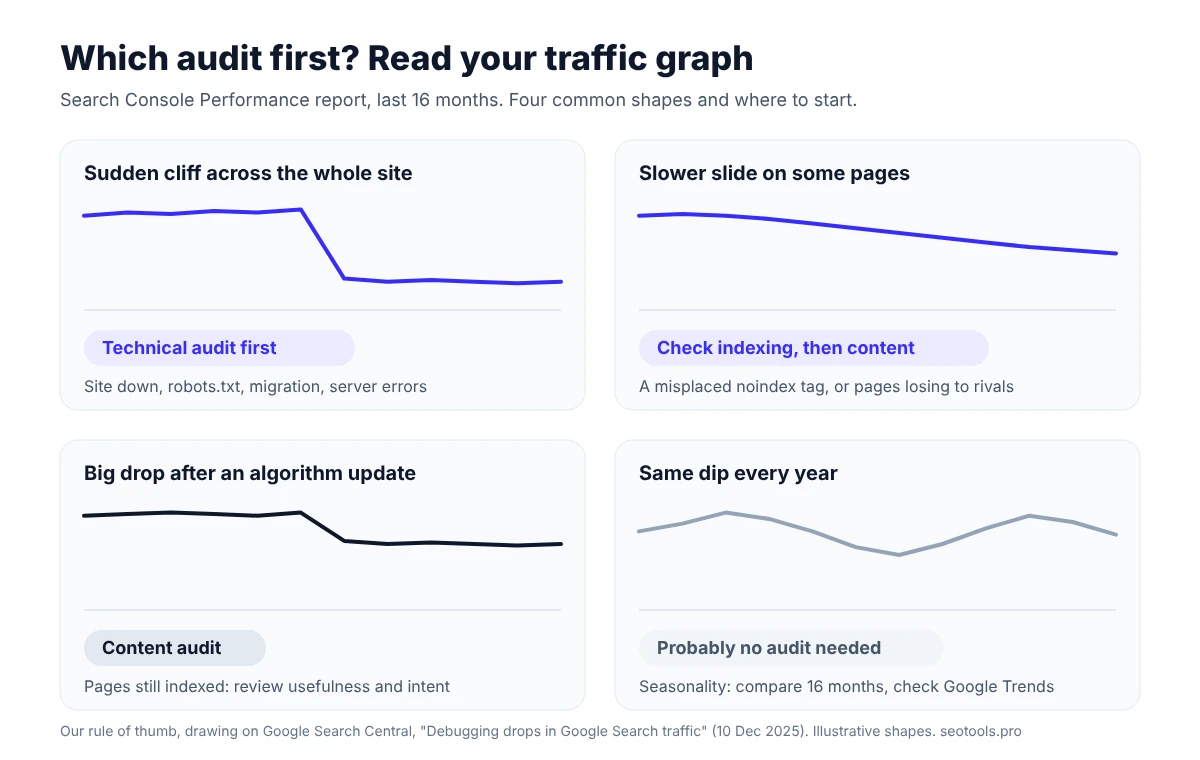
- A sudden cliff across the whole site. Think technical first: site down, robots.txt, a migration gone wrong. Google's example of a site-wide technical issue is "your website is down".
- But check the date. Google also links a large drop to algorithm updates and security or spam issues. Look at the Manual actions and Security issues reports too.
- A slower slide on some pages. Google notes a misplaced noindex tag causes "a slower drop in traffic". Check those URLs' indexing before you rewrite them.
- A drop after a core update. If pages are still indexed, it's a content question. Google says "there might not be anything fundamentally wrong with your content."
- The same dip every year. That's seasonality. Compare 16 months of data and check Google Trends before buying any audit.
Google also suggests sorting pages by "Clicks Difference" to find those that lost the most. That list is where both audits should start.
Run a Technical Audit First If…
- Traffic fell sharply on a specific day across most of the site, and no core update or manual action lines up with that date.
- You redesigned, moved domains or changed URLs in the last few months.
- Search Console shows a jump in "Not indexed" pages, server errors or 404s.
- Important pages are missing when you search for their exact title.
- The site is new. Make sure Google can index it before you judge the content.
Sitebulb's guide to audit types puts the order simply:
"Once a solid technical foundation is in place, the next pillar of SEO to address is content."
— Geoff Kennedy, Sitebulb, "Types of SEO Audits", 10 February 2021Run a Content Audit First If…
- Pages are indexed but stuck on page 2 or lower.
- Traffic declines slowly on older posts while newer competitors climb.
- Two of your pages compete for the same keyword and swap places.
- You have hundreds of posts and no idea which ones bring visits or leads.
- Prices, dates or screenshots are out of date across your guides.
Google's quality questions are a good scoring sheet for each page. One of them: "Does the content provide original information, reporting, research, or analysis?"
The CNET Lesson: A Content Audit Is Not a Delete Button
In August 2023, Gizmodo reported that CNET had removed thousands of old articles. CNET didn't say exactly how many.
The reason was in an internal memo about removing, redirecting or refreshing irrelevant or unhelpful URLs.
In the memo's words, this "sends a signal to Google that says CNET is fresh, relevant and worthy of being placed higher than our competitors in search results".
Google's Search Liaison, Danny Sullivan, answered on X:
"Are you deleting content from your site because you somehow believe Google doesn't like "old" content? That's not a thing!"
"Our guidance doesn't encourage this. Older content can still be helpful, too."
— Google SearchLiaison, 8 August 2023, as quoted by Search Engine RoundtableGoogle's helpful content guide makes the same point. It asks if you're removing a lot of older content to make your site seem "fresh". Its answer: "(No, it won't)".
So use a content audit to improve pages first. Remove or merge a page only when it has no traffic, no links, no purpose and no better home.
Sullivan did add one nuance. On a "massive site", removing pages might help Google "crawl other content on the site." That's a technical reason, and it mostly applies to very large sites.
One Free Audit, Both Kinds of Issues
In practice, the line between the two audits is blurry. A good audit tool flags both.
We ran our free Website Audit on our own site, seotools.pro, on 29 October 2026. It scanned 20 pages live, with no sign-up.
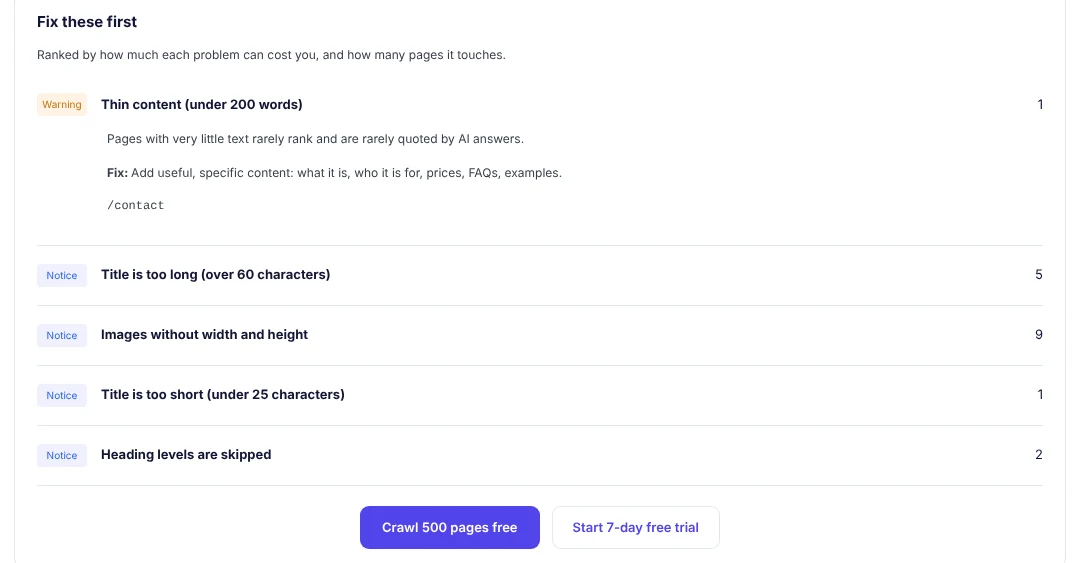
Look at the mix. The top warning, thin content on the contact page, is a content issue.
Images without width and height are technical. Long titles and skipped heading levels sit in between: on-page issues that both audits touch.
That's why a free scan is a smart first step. It shows which kind of problem dominates before you pay for a deep audit.
A 30-Minute Check Before You Pay Anyone
- Open the Search Console Performance report. Set 16 months. Look for a cliff, a slow slide or a yearly pattern.
- Compare periods. Sort pages by clicks lost. Note the top 10.
- Check the Page indexing report. A spike in "Not indexed" pages points to a technical audit.
- Inspect 3 to 5 lost pages with the URL inspection tool. Are they indexed? Is the canonical yours?
- Run a free scan with our Website Audit to catch crawl, title and thin-content issues.
- Check rankings for the lost pages' main keywords. Our Rank Tracker shows who sits in the top 10 now.
- Check Google Trends for your main topic. Maybe fewer people search for it.
If steps 3 and 4 show problems, start with the technical audit. If pages are indexed but outranked, start with the content audit.
What People Search For
We checked these terms in our free Keyword Research tool on 29 October 2026 (United States database):
- "technical seo audit": about 720 searches a month, difficulty 53, about $5.46 a click.
- "technical seo audit services": about 480 searches a month, about $7.46 a click.
- "content audit": about 390 searches a month, about $7.77 a click.
- "seo content audit" and "content audit tool": about 170 each.
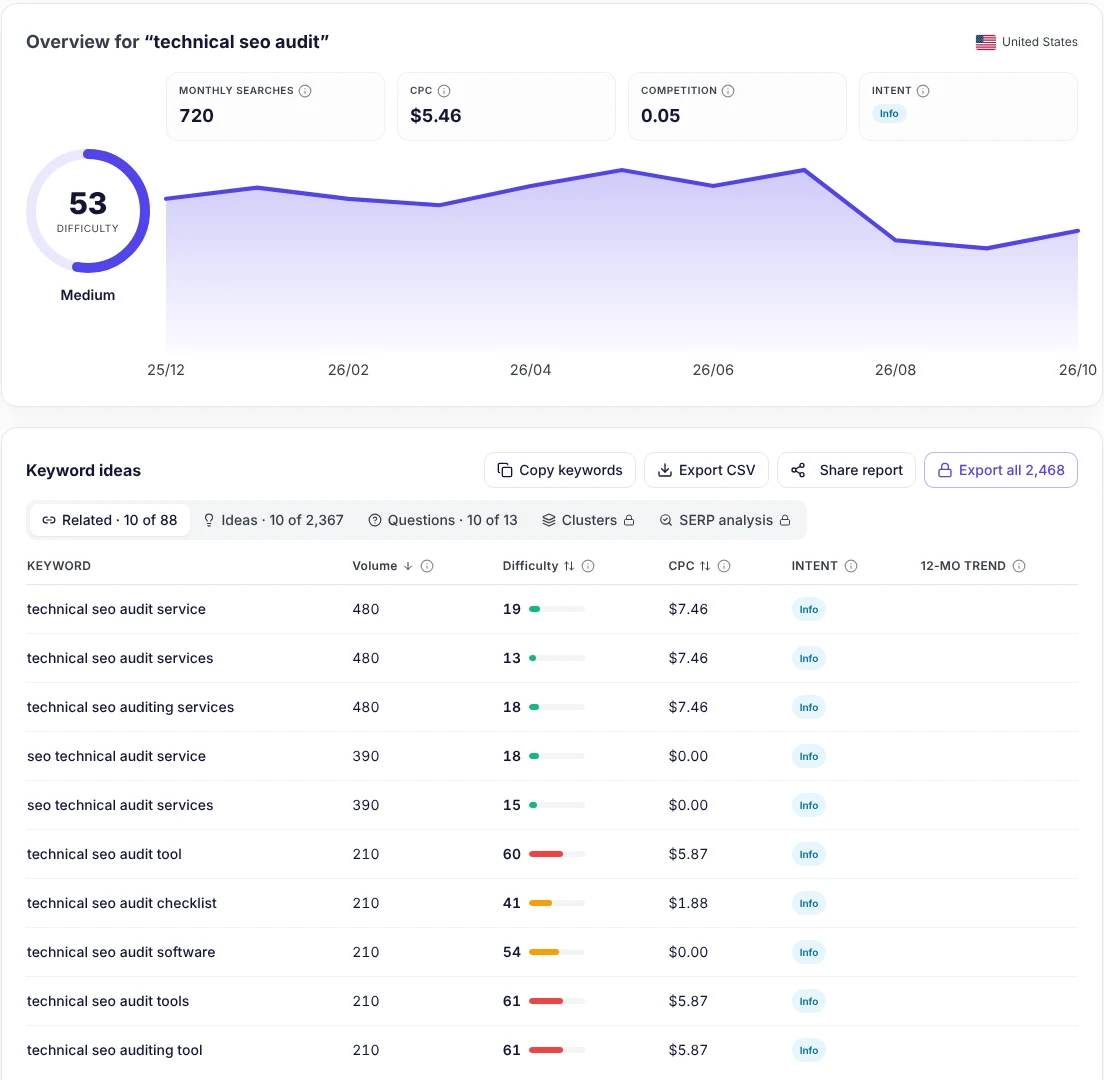
In this data, "technical seo audit" gets almost twice the searches of "content audit" (720 vs 390).
Tools and Costs for Each Audit
| Tool | Best for | Free option | Paid |
|---|---|---|---|
| Google Search Console | Both: indexing, clicks, queries | Free | — |
| seotools.pro Website Audit | Technical and on-page issues | 20 pages, no sign-up; 500 pages per audit with a free account | Lite $24/month (5,000 pages per audit), Pro $49/month (25,000) |
| seotools.pro Content Optimizer | Updating pages after a content audit | Free tool page | 10 docs/month on Lite, 50 on Pro |
| Screaming Frog SEO Spider | Deep technical crawls | Up to 500 URLs | £199 a year per licence |
Prices checked on vendor pages on 29 October 2026 (seotools.pro on monthly billing). Yearly billing on seotools.pro is $20 (Lite) and $41 (Pro) a month.
At least one top-ranking guide quotes audit price ranges with no source. For sourced numbers, read one-time SEO audit vs monthly retainer.
When You Need Both, or Need Help
Many older sites need both audits, in that order: technical first, content second.
A simple rhythm many small sites can follow:
- Every month: a quick automated scan and a look at Search Console.
- Every year: a full content audit of every indexed page.
- Before and after any redesign or migration: a full technical audit.
No time to do it yourself? Our SEO and GEO services include a full website audit with every package. Larger packages add technical SEO fixes.
Pricing depends on your site. Book a free consultation with Anatolii Ulitovskyi to see which audit your site needs first.
A full disclosure: seotools.pro sells SEO software and done-for-you SEO. That's why we show our sources and tested our own site.
Scan your site free and see if technical or content issues come first. Results start in about a second.
- 20-page live scan, no sign-up
- Free account: 500 pages per audit
- Fixes ranked by impact
- 7-day free trial on Lite, Pro and Business
The Verdict
A technical audit makes sure Google can see your pages. A content audit makes sure they're worth seeing.
If traffic fell off a cliff, or you just changed your site, start technical. If pages are indexed but losing to competitors, start with content.
If you're not sure, spend 30 minutes in Search Console and run a free website audit. The data usually tells you where to start.
FAQ
What is the difference between a technical SEO audit and a content audit?
A technical audit checks if search engines can crawl, render and index your pages. A content audit checks if each page is useful, accurate and worth ranking, then decides to keep, update, merge or remove it.
Which should I do first?
Usually the technical audit, because content can't rank if Google can't index it. Start with content if Search Console shows your pages are indexed but they rank low or decline slowly.
How often should I run each audit?
There's no official rule. A practical rhythm: an automated technical scan monthly, a full content audit about once a year, and a technical audit before and after any redesign or migration.
Should I delete old content after a content audit?
Not just because it's old. Google says removing lots of older content to seem "fresh" won't help. Update useful pages, merge overlapping ones, and remove only pages with no traffic, links or purpose.
Can I do both audits for free?
You can start. Google Search Console is free, and our Website Audit scans 20 pages with no sign-up and 500 pages per audit with a free account. Big sites usually need a paid crawler.
Sources
Traffic drop patterns and quotes: Google Search Central, "Debugging drops in Google Search traffic" (last updated 10 December 2025).
Old content and quality questions: Google Search Central, "Creating helpful, reliable, people-first content" (last updated 5 October 2026).
Zero-traffic pages: Ahrefs, "96.55% of Content Gets No Traffic From Google" (Tim Soulo, 2023).
CNET: Gizmodo, 9 August 2023; Search Engine Roundtable, 9 August 2023.
INP: web.dev, "Interaction to Next Paint is officially a Core Web Vital" (March 2024). Audit types: Sitebulb.
Tool prices and limits: seotools.pro pricing and Screaming Frog pricing, checked 29 October 2026. Search data and audit: seotools.pro, 29 October 2026.