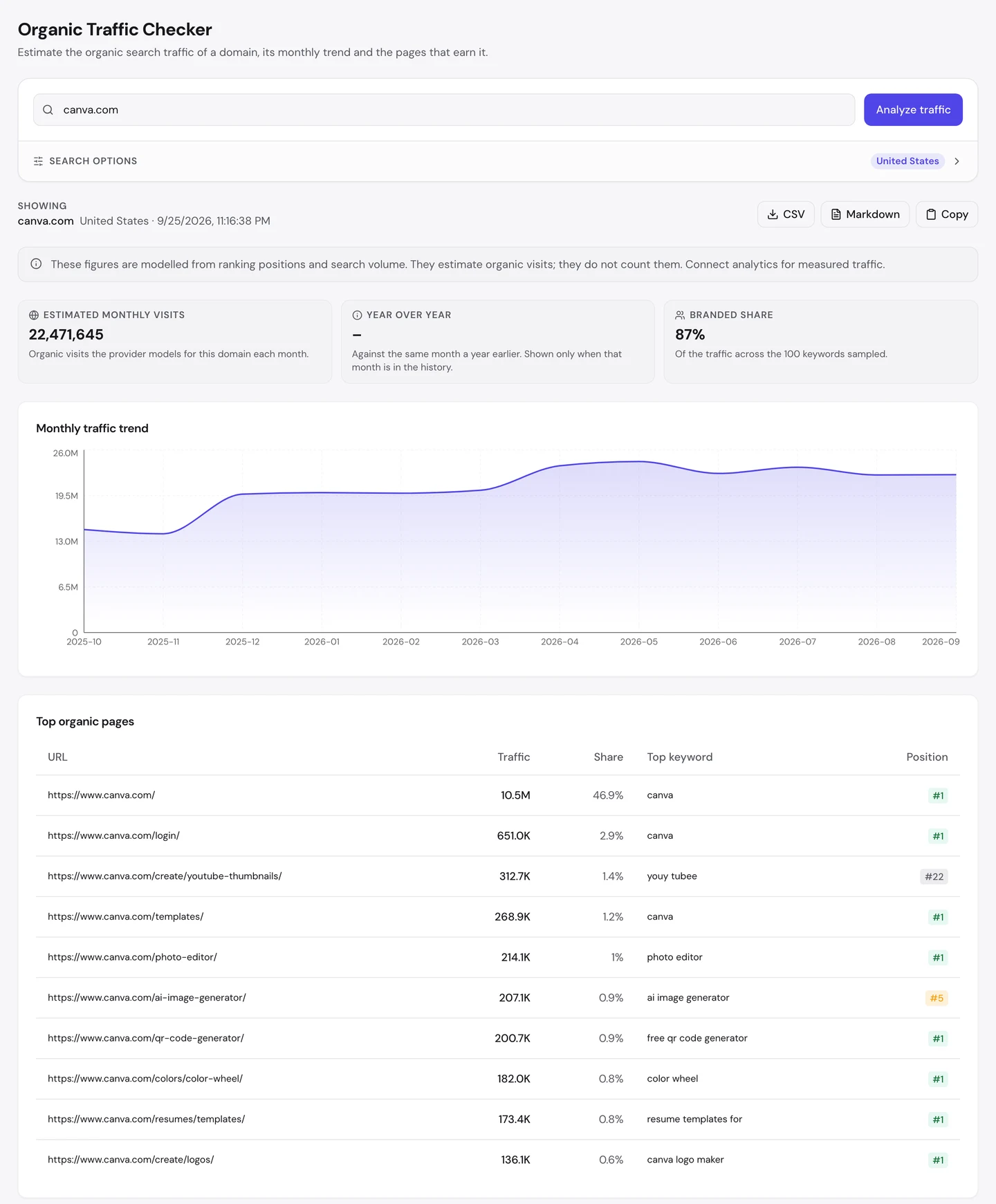
Canva gets 22M visits a month from Google in the US, and 87% of them come from people who already know its name.
Its homepage alone brings in almost half of those visits.
The rest mostly land on small free tools, like a QR code maker and a color wheel. We ran canva.com through our whole SEO toolkit to see how it all fits together.
Here are 7 lessons you can copy, plus the one thing you can't.
Make your name the thing people type
We started with our Organic Traffic Checker. It estimates a site's organic traffic, meaning the people who find it on Google without ads.
For Canva, that's about 22M visits a month in the US. And 87% of them are brand searches, from people who type "canva" on purpose.
Then we opened the Keywords tab of our Website Audit. It lists every search a site ranks for, where it ranks, how often people search it and how many visits it sends.
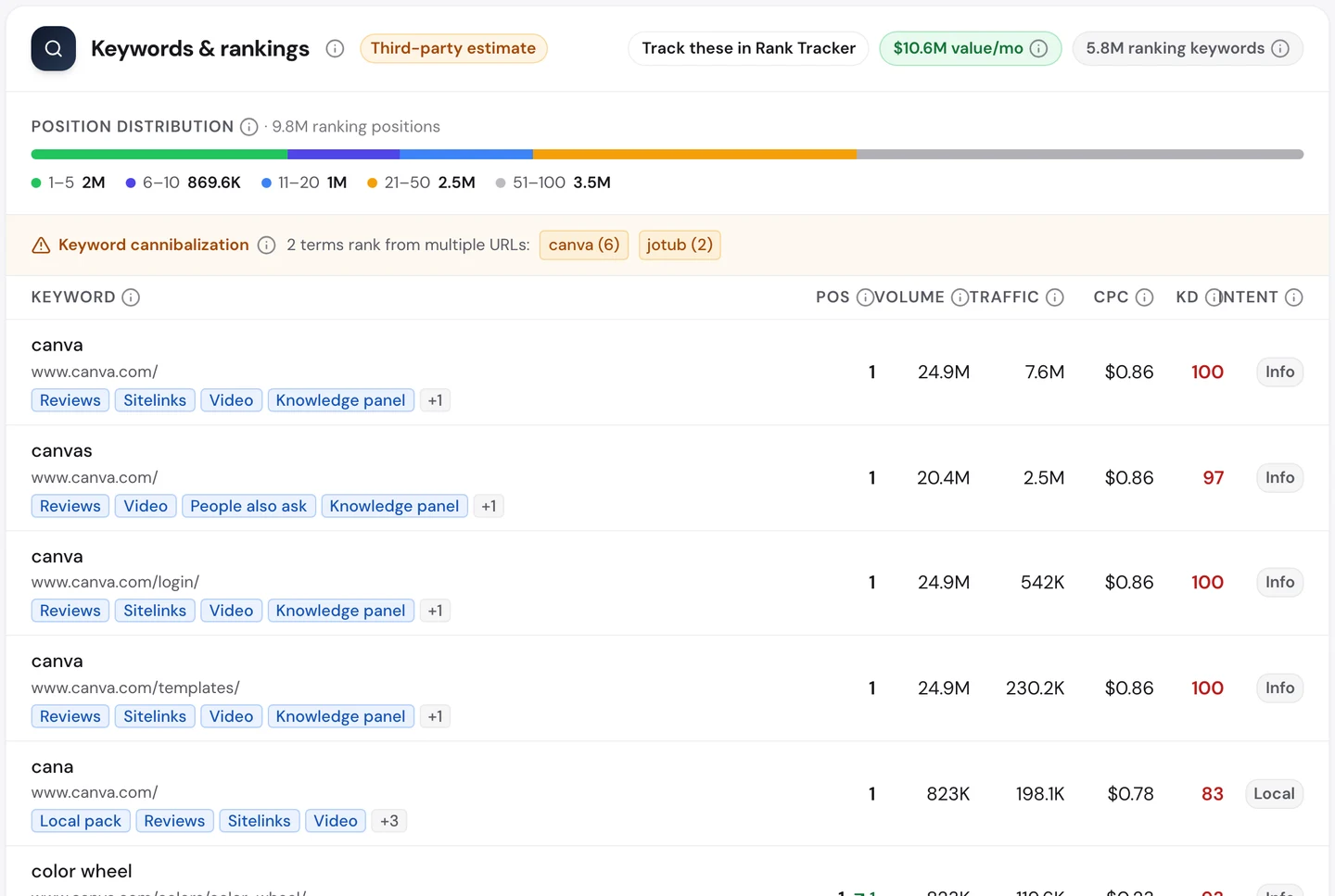
"Canva" is searched about 25M times a month, and Canva ranks first. It even ranks first for "canvas", which is mostly people misspelling its name.
That's the real engine. You hear about Canva from a friend, a teacher or a coworker, then you search for it by name.
Compare that with RTINGS, the product testing site we studied on its own. Only 1% of its visitors search for its name.
Chess.com, the online chess site we also looked at, sits even higher at 92%. Sites like these can lose a ranking and still keep their visitors.
So check your own brand share in the same report. If it's low, each visit hangs on a ranking, and that won't make people remember you.
Give away the tool people search for
Now look past the brand pages. Most of Canva's biggest non-brand pages are free tools that each do one job.
There's a photo editor, a QR code generator and a color wheel. Each one ranks first on Google for its plain name.
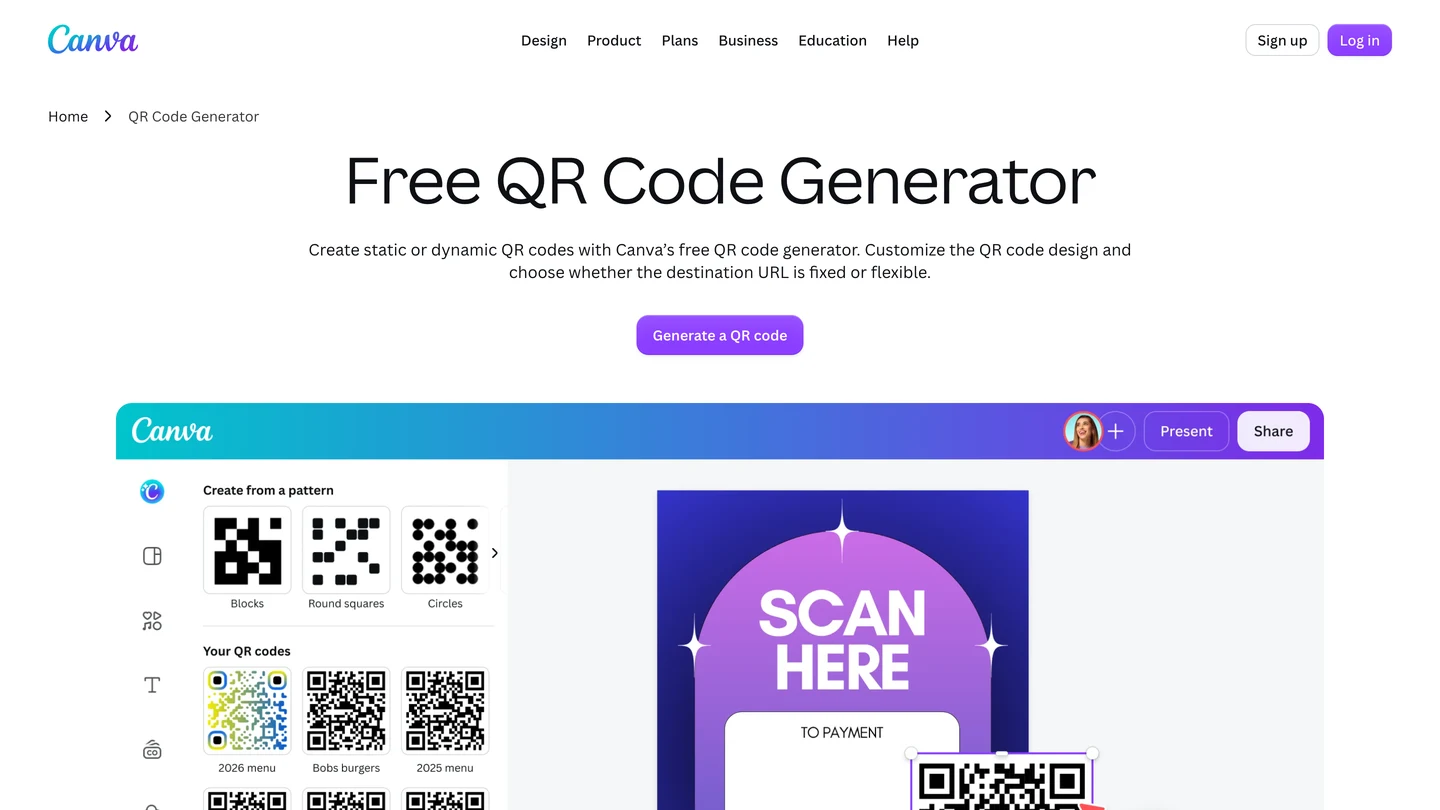
Why does a page like this win? Our free browser extension shows you in one click.
Open the page, click the seotools.pro icon, and a panel opens beside it. It runs 35 SEO checks and scores this page 90 out of 100.
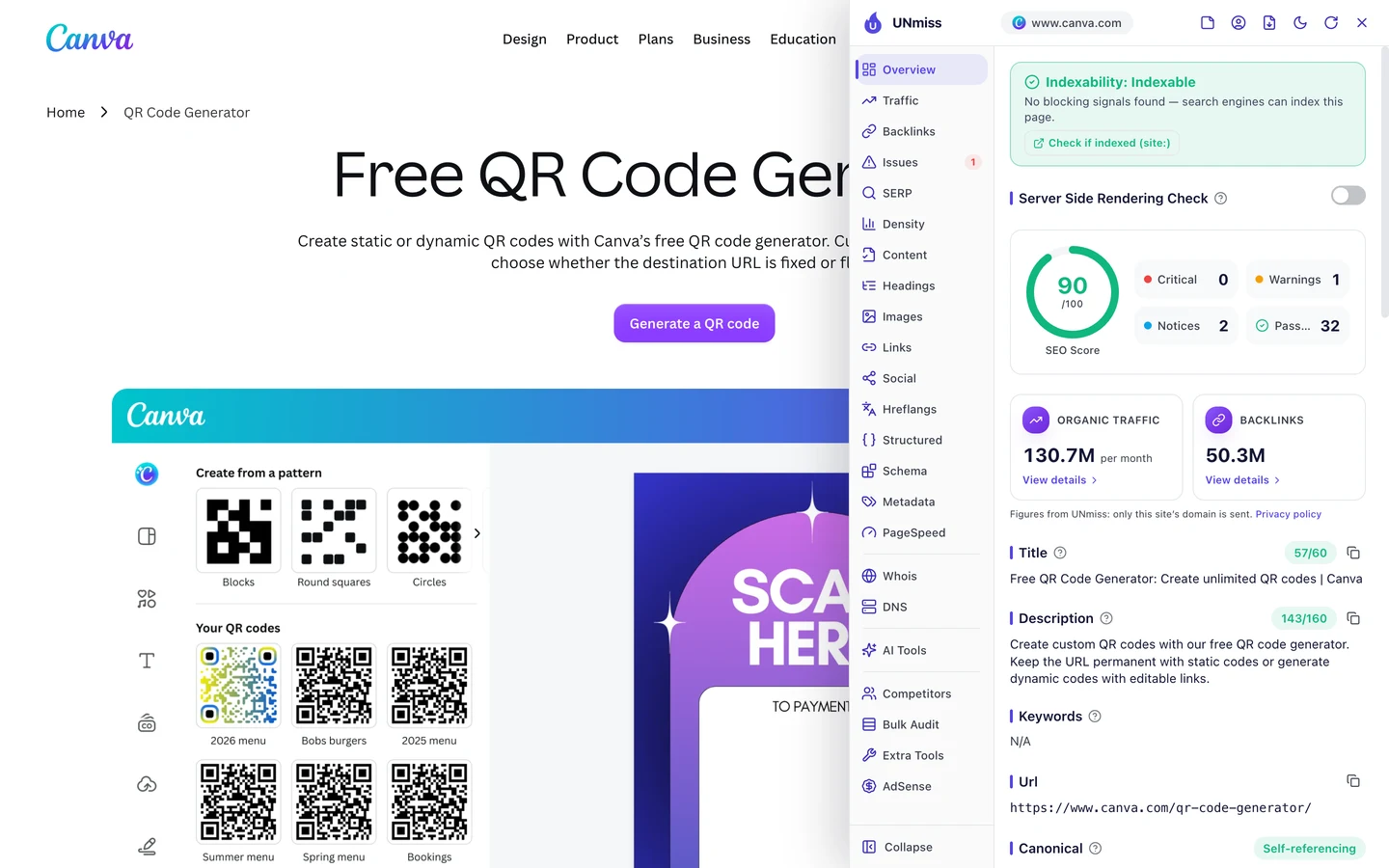
Look at the title first. It starts with "Free QR Code Generator", the exact words people type into Google.
The Structured tab shows the second trick. The page carries structured data, hidden code that tells Google what's on it, like the steps to make a QR code.
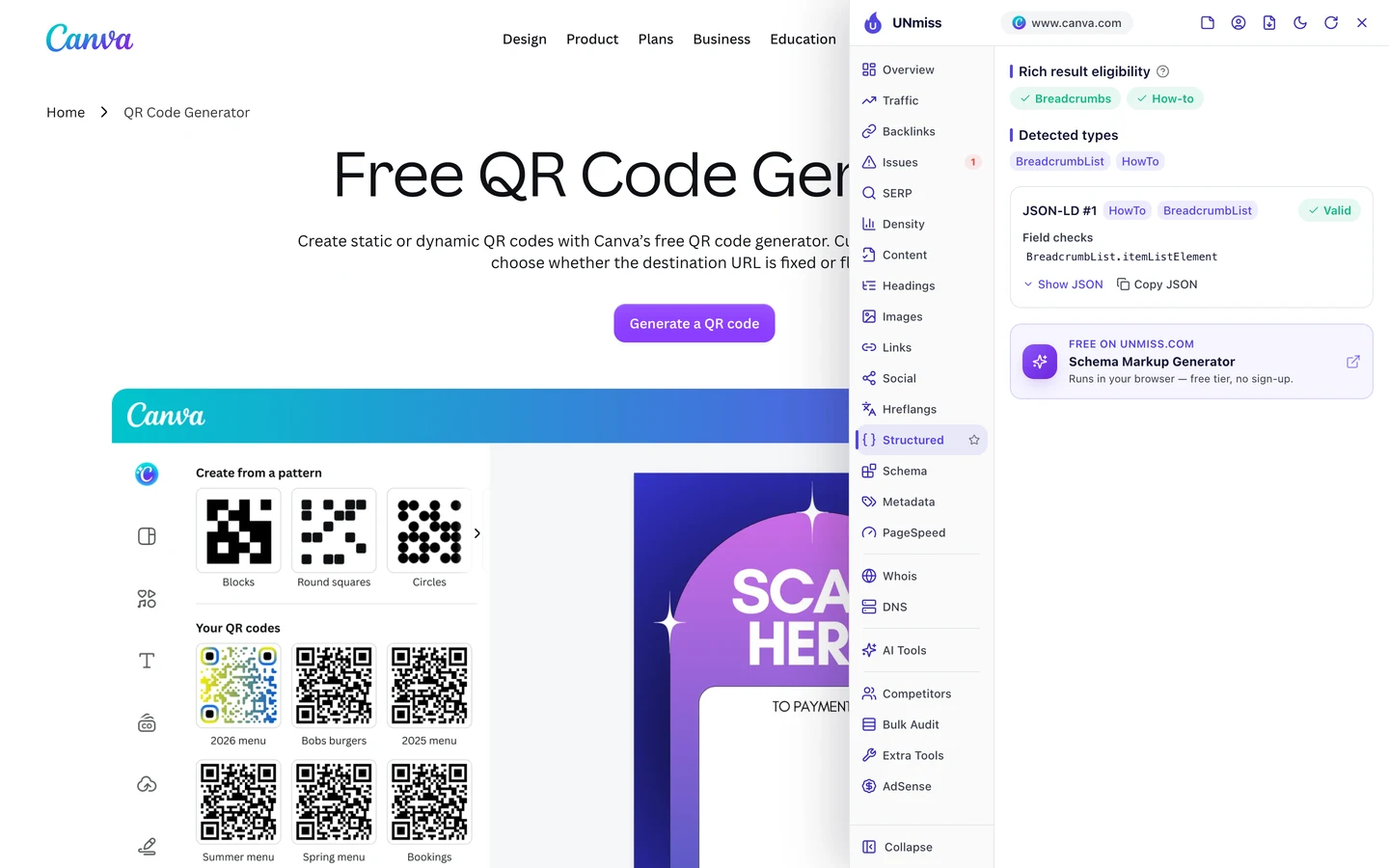
That lets Google show those steps right in its results. The page's only warning is small: 13 images with no alt text, the short label that describes a picture.
You can build the same kind of page. Find a small job your customers do by hand, and check how many people search for it with our Keyword Research tool.
Then name the page with the exact search, put the tool at the top, and add the steps below it. Calculator.net, which we studied on its own, gets 11M visits a month this way.
Canva's free tools rank first for plain searches like "photo editor" and "color wheel". A good tool takes weeks, not years. Knowing which one your buyers search for is the hard part, and that's where we start.
- We find the tool your buyers already search for
- We design, build and host it on your domain
- We name it and mark it up so Google shows it
- A fixed price, agreed before we start
Make your product easy to share
A backlink is a link from another website to yours. Google treats each one a bit like a vote of trust.
The Backlinks tab of our audit counts about 50M links to Canva, from more than 500K different websites. That's the same data our Backlink Analyzer shows on its own.
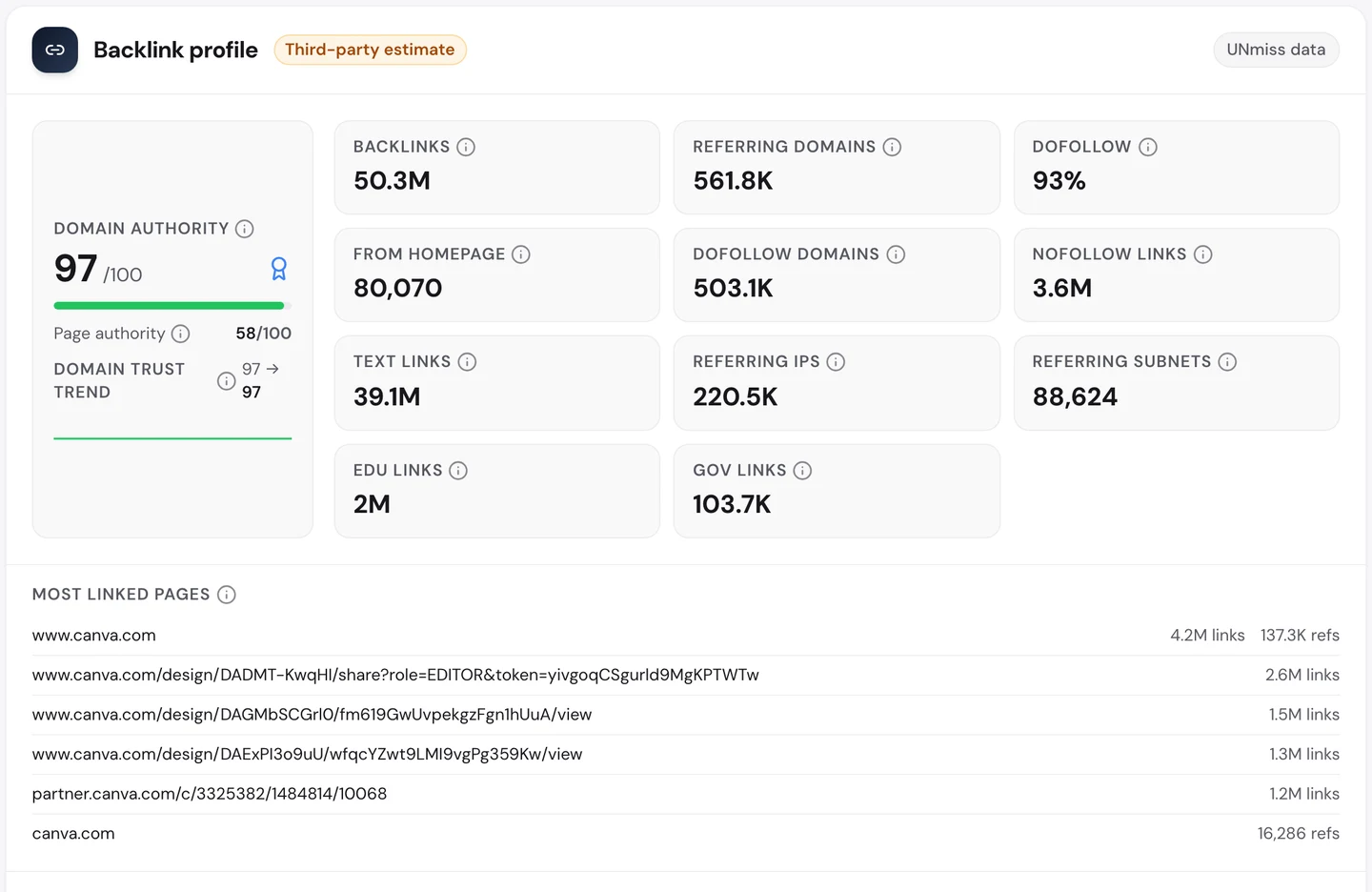
Now look at the most linked pages. After the homepage come 3 designs that Canva users made and shared.
One shared design alone has about 2.6M links pointing at it. People paste the link into class pages, event sites and team wikis.
Canva didn't write those pages. Its users did, and every share sends a link, and a new visitor, back to Canva.
That's why 93% of its links are dofollow, meaning they pass Google trust. People rarely switch that off on a link they chose to share.
So ask what your customers could share. A report, a result or a design all work, as long as the shared page carries your name.
Go where your users live
The 22M figure counts the US only. The Traffic tab of our audit shows the full picture.
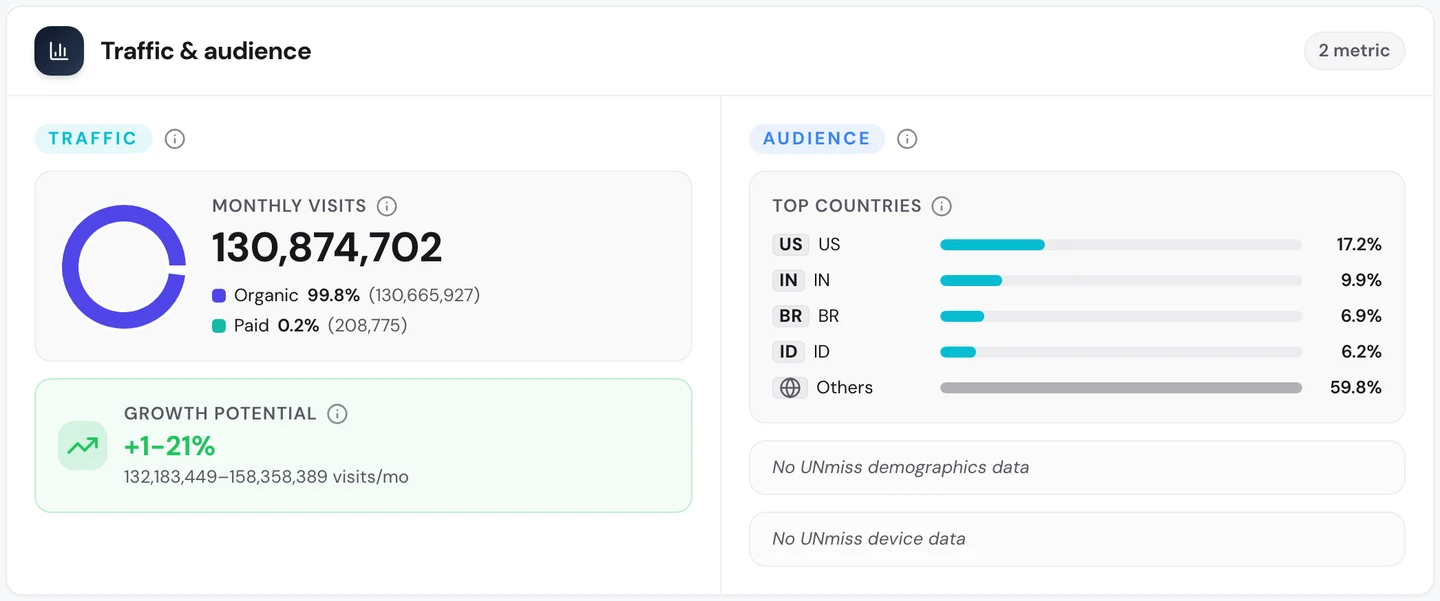
Worldwide, Canva gets about 131M search visits a month. Fewer than 1 in 5 come from the US.
India, Brazil and Indonesia are close behind.
To serve them, Canva publishes each page in many languages. Our extension's Hreflangs tab lists more than 100 of them on the homepage alone.
Hreflang tags are hidden labels that tell Google which language and country each version is for. The extension checks every code as well.
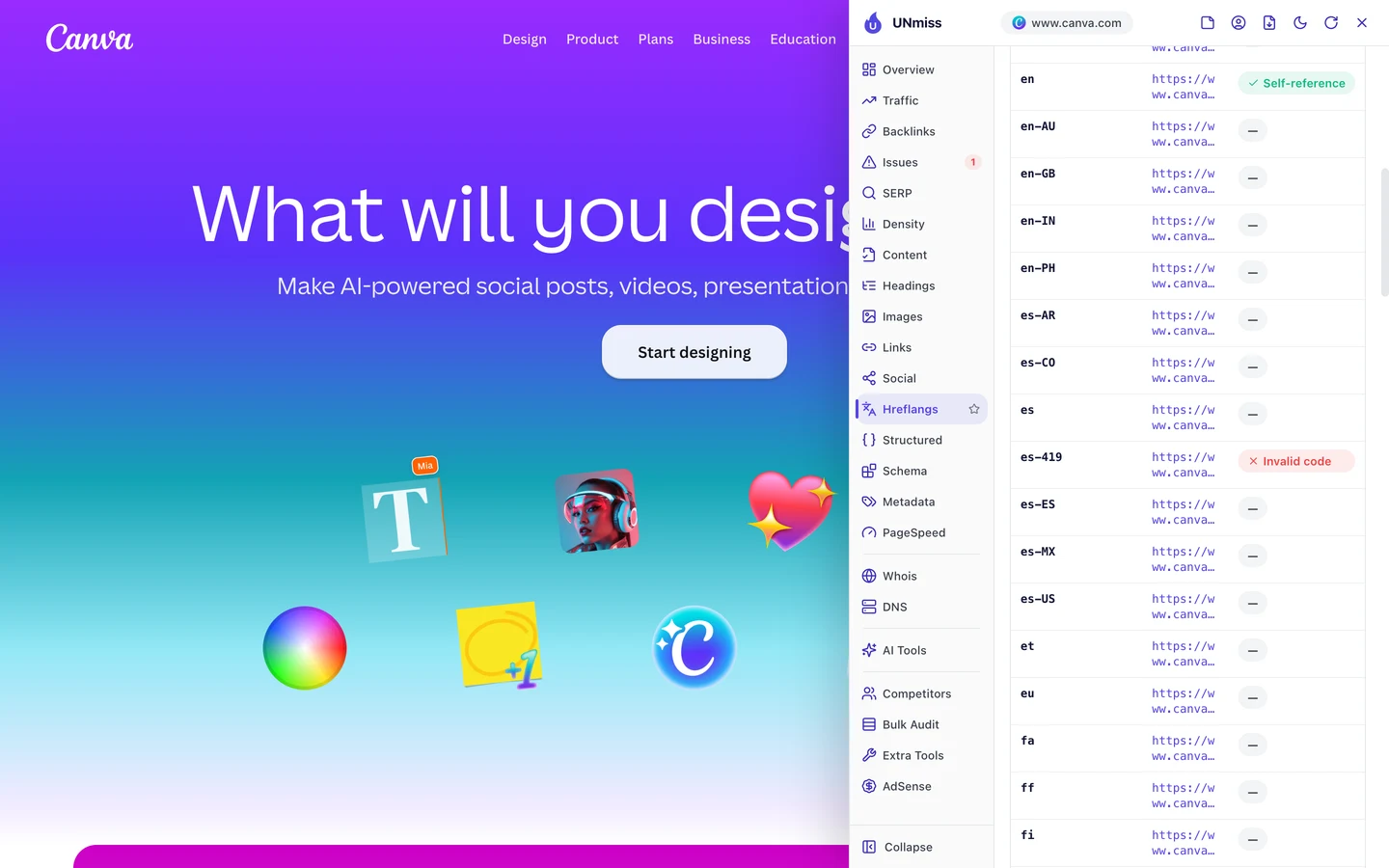
One label fails: "es-419", Spanish for Latin America. Google only accepts 2-letter country codes, so it ignores that one.
It's a small miss on a huge site, and you could fix it in minutes. If you publish in more than one language, open your homepage with the extension and check yours the same way.
Audit what bots see on your site
Canva is strict about which programs may read it. Those programs are called crawlers, and they visit pages to read them, the way Google does.
The rules live in robots.txt, a file that tells crawlers what they may read. Our extension reads it for you and lists the AI crawlers by name.
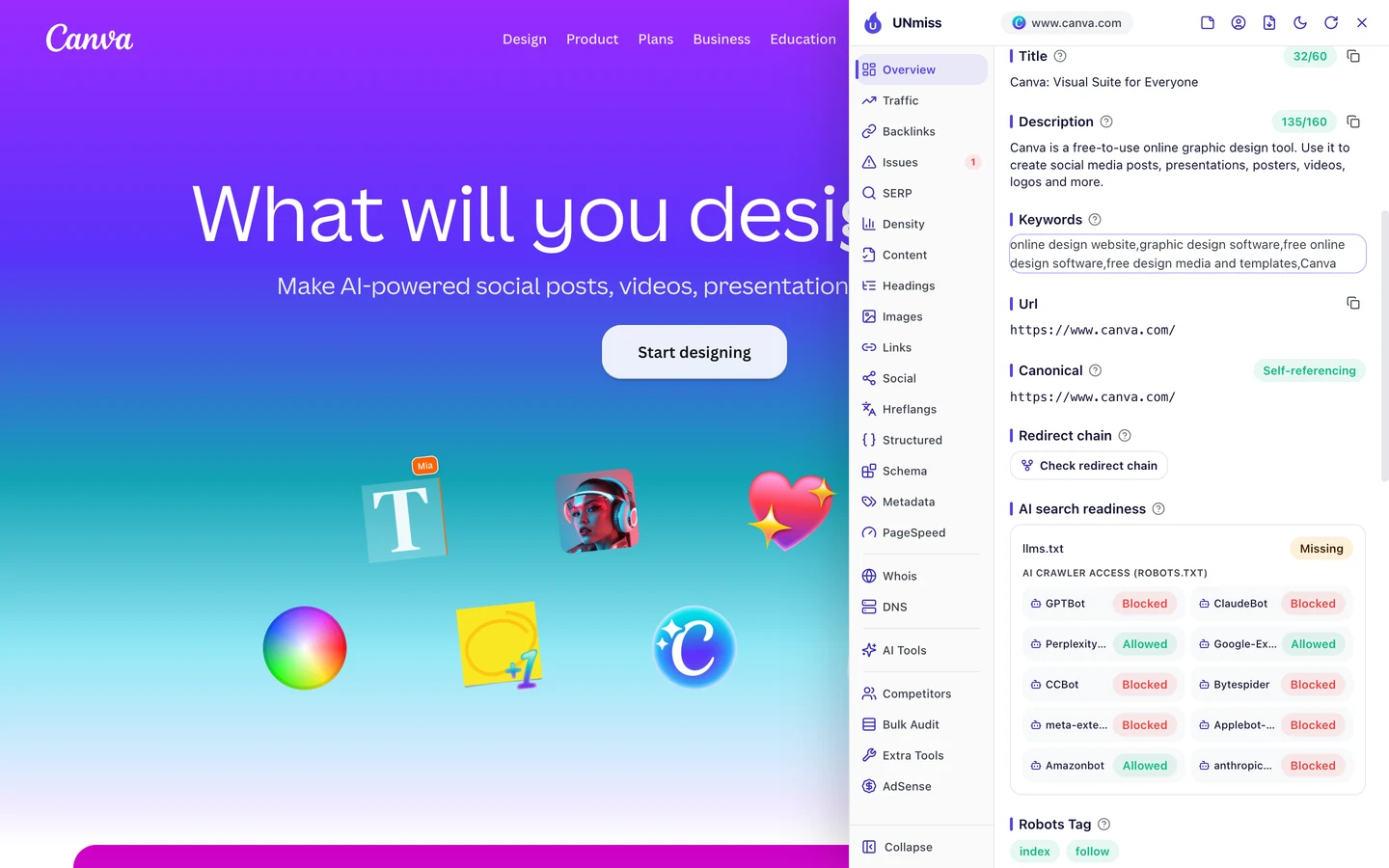
The crawlers behind ChatGPT and Claude are blocked from almost the whole site. Canva lets them read only its sales pages, like the "create" and "features" pages.
Perplexity and Google's AI crawler get full access. So AI tools can learn what Canva sells, but they can't copy its templates and designs.
Our Website Audit shows the other side of that choice. We had it crawl about 250 pages from Canva's sitemap, the file that lists a site's pages for Google.
It works like Google's own crawler, opening each page and testing it against a long list of checks. On Canva, many pages came back as a bare page titled "Unsupported client".
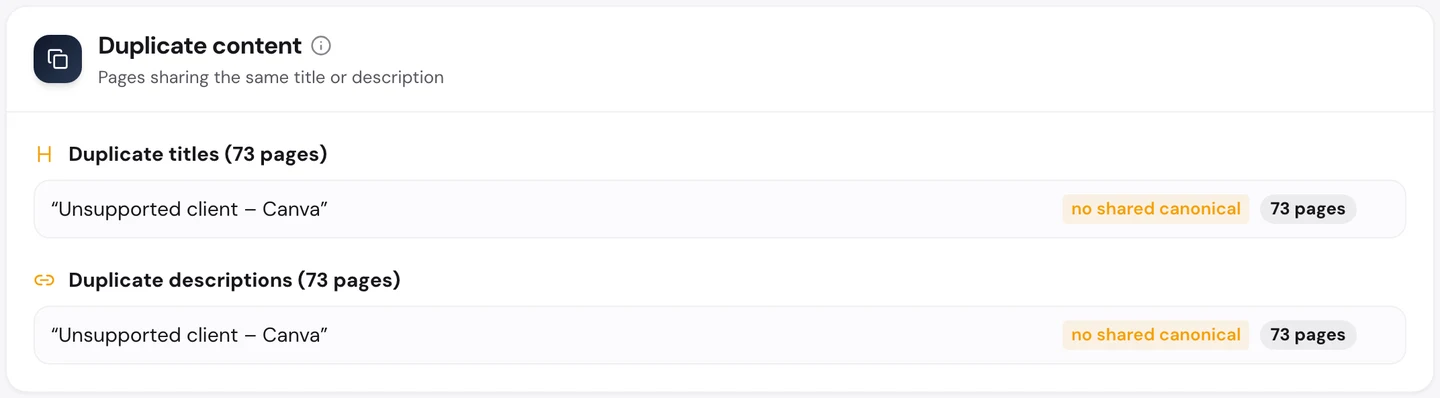
That's the page Canva serves to a crawler it doesn't support. Google still gets the real page, which is why these pages rank.
So run the audit on your own site and see what an outside crawler gets. If you block too much, you can hide pages you want found.
Write your own rules with our robots.txt generator. Then run our AI Visibility Checker to see if AI tools name you when people ask about your field.
Know which rivals share your words
It also helps you to know who you're up against. The audit's Competitors tab lists the sites that rank for the same searches as you.
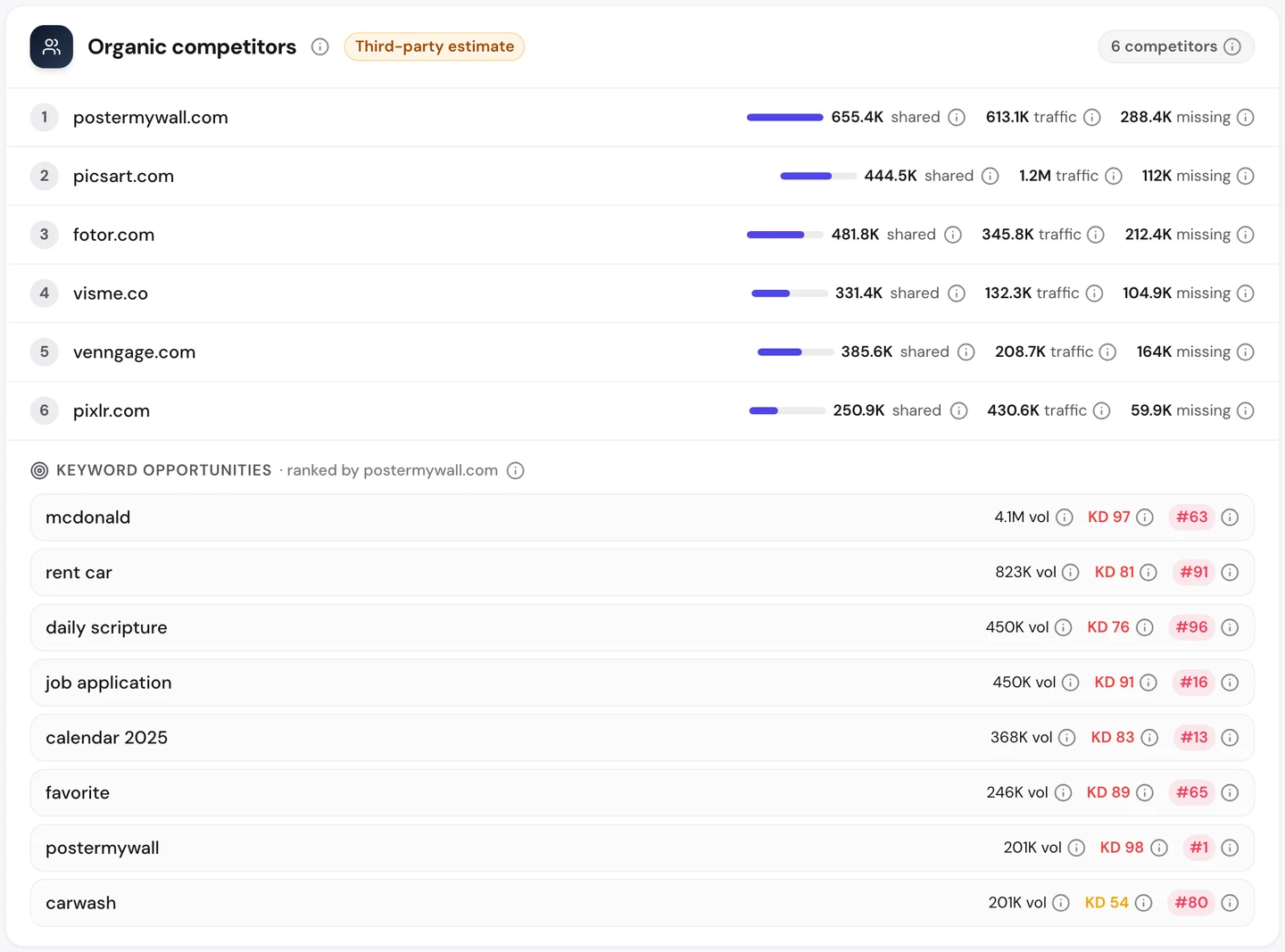
PosterMyWall shares the most searches with Canva. Picsart gets the most traffic of the group, about 1.2M visits a month.
Yet each gets a small fraction of Canva's traffic. Sharing your rival's words isn't enough if they own the name people type.
Still, the tab shows the searches each rival wins that you don't. Those are the easiest gaps to close, and the first pages to track in our Rank Tracker.
Let weak pages fall away
Our Domain Overview shows Canva ranking for about 5.8M keywords. A keyword is just a phrase people type into Google.
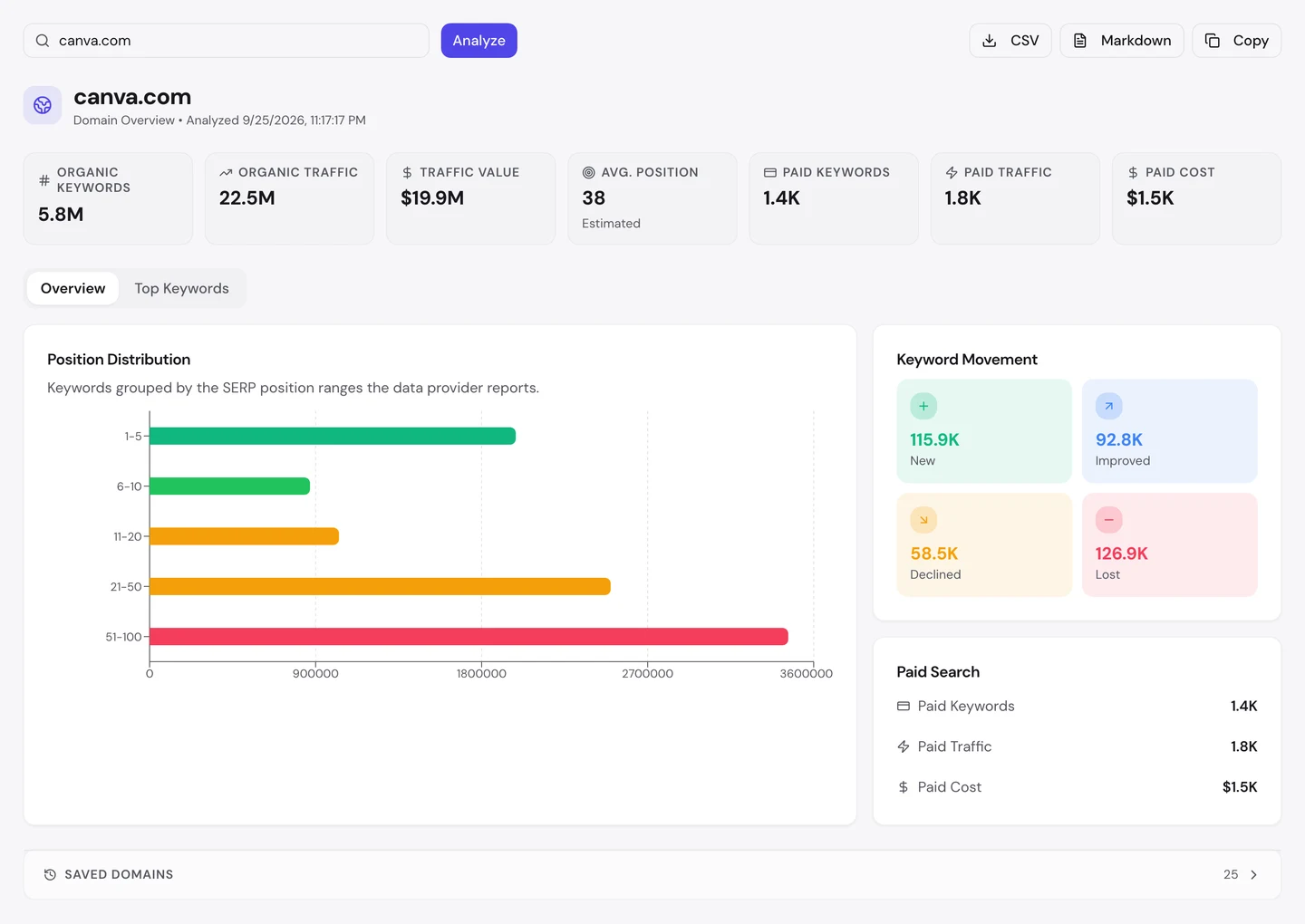
It values that traffic at about $20M a month. That's what the same visits would cost as Google ads.
Look at the movement, though. Canva gained about 116K keywords and lost about 127K in the same period.
That's normal for a site this size. Pages for old trends and fading searches drop out, while new ones take their place.
So don't panic when you see your own count slip. Check whether your best pages still rank, not whether your total went up.
87% of Canva's search visits come from people who already know it. Our Organic Traffic Checker shows the brand share and top pages for any site, so you know which kind of site you're running.
- The same report that found Canva's free tools ranking first
- Brand share, visits and the top page for each search
- Run it on any rival's domain too
What you cannot copy
First, the part you can't copy: a product that millions of people talk about.
Canva launched in 2013 from Australia. Years of word of mouth, in classrooms and offices, are why so many people now search for it by name.
Now a few honest notes on the numbers.
We took all our figures on 25 September 2026. The 22M figure counts US searches, and the 131M worldwide figure comes from the audit's Traffic tab.
Both are estimates. Nobody outside Canva can count its real visits, so tools work them out from rankings and search volume.
The audit's crawl results show what Canva serves to an outside crawler, not what Google sees. That's why we used them to show the bot wall, not to judge Canva's pages.
The robots.txt rules are Canva's own, read on the same day, and a site can change them at any time.
The one number to take away
2.6M.
That's how many links point at a single design that one Canva user shared. Canva never asked for those links, because its users built them for it.
That's the goal for any product. Give people something worth sharing, and make sure every share carries your name.
Found something your customers could share? That could be your next link source.
You can run every one of these checks on your own site, and on your rivals', and see the same numbers for yourself.
Frequently asked questions
Is a free tool worth building if I sell something expensive?
Often, yes. A free tool brings people in at the moment they have the problem you solve. Put a clear next step beside the result, like a demo, a quote or a trial, so the right visitors can go further.
Should my free tool ask people to sign up?
Not before they get a result. People came for an answer, and a sign-up wall sends many of them back to Google. Ask for an email only when they want to save, download or share what they made.
Can a small site rank a free tool against big brands?
Yes, if you start narrow. Big sites own the plain searches, but they often ignore specific ones, like a tool for one job or one industry. Win a few of those first, then work up.
Does blocking AI crawlers hurt my Google rankings?
No. Google's search crawler is separate from the AI crawlers, and blocking GPTBot or ClaudeBot doesn't change how Google ranks you. It only decides whether those AI tools can read your pages.
Are links from shared pages treated as spam?
Not when real people choose to share them. Google warns against links you pay for or hide in widgets, but a user sharing their own work is normal. Just don't force a link into things people share.
How many languages should I start with?
Start with the 1 or 2 where you already get visitors or sales. Translate your most visited pages properly, then add more languages once those start to bring in traffic.
How long does a new free tool take to rank?
Usually a few months. A tool on a site Google already trusts can show up within weeks, while a new site waits longer. Track the page's position so you can see it moving before the traffic arrives.
Do I need an llms.txt file?
It's optional. An llms.txt file is a short guide that tells AI tools which pages matter most, and Canva doesn't have one yet. It's cheap to add, but your robots.txt rules decide what AI crawlers can actually read.